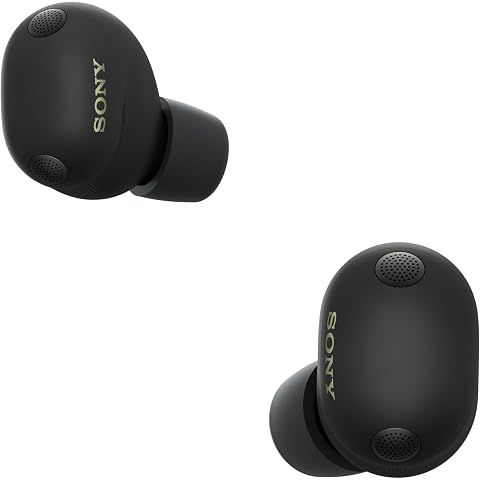
How do I factory reset the Sony WF-1000XM6?

Published: March 30th, 2026
2 min read
Recently Updated: March 30th, 2026
Sony WF-1000XM6 The Best Truly Wireless Noise Cancelling Earbuds (2026 Model), Bluetooth in-Ear Headphones, with Studio-Quality Sound, Up to 24 Hours of Battery Life, Black
Watch products with ShopSavvy for price drops, stock alerts, deals and more.

So something's gone wrong with your Sony WF-1000XM6 and you need to start fresh? A factory reset will wipe everything clean and get you back to square one. Here's exactly how to do it.

The reset process:

  1. Pop both earbuds into the charging case, but leave the lid open
  2. Touch and hold both touch sensors at the same time—keep holding for about 10 seconds
  3. Watch the little lights: they'll flash blue first, then turn red briefly, then shut off completely
  4. Let go when the lights turn off
  5. Close the case, count to ten, then open it again
  6. Done! The earbuds will automatically go into pairing mode, ready for a fresh start

Heads up—this erases everything:

All your paired devices? Gone. That EQ preset you spent 20 minutes perfecting? Gone. Touch control customizations? You guessed it. You're essentially taking the earbuds back to how they were when you first unboxed them.

When is this actually necessary?

Honestly, you probably don't need a full reset most of the time. Try this first: just put the earbuds back in the case for 10 seconds, then take them out. This soft reset often fixes minor Bluetooth hiccups without nuking all your settings.

But if you're dealing with persistent problems—one earbud won't connect, audio sounds weird, pairing keeps failing—then yeah, the nuclear option makes sense. Also do this before selling or giving away your earbuds, so the next person gets that fresh setup experience.

After resetting, you'll need to pair everything again from scratch. Annoying, but usually worth it when it fixes whatever was driving you crazy.

Lowest at Amazon
$298.00 at Amazon
Lowest at any Popular Retailer
$298.00 at Amazon
How we researched this

Where this comes from: This answer is based on ShopSavvy's product database, real-time pricing from 1 retailers, and a look at hundreds of user reviews to give you a well-rounded picture.

Considering the Sony WF-1000XM6 Earbuds?

Here's our "TLDR" Review

Get ShopSavvy
ShopSavvy is totally free and works on all popular phones and browsers
Download ShopSavvy App

Compare prices for anything in real-time, set price alerts, watch for deals by keyword, and much more

Install ShopSavvy Browser Extension

Compare and track prices automatically while you shop online at thousands of websites.

More Answers

If you're still curious about the Sony WF-1000XM6 Earbuds, here are some other answers you might find interesting:

What is Quick Attention mode on the Sony WF-1000XM6?

Published: March 31st, 2026
Recently Updated: March 31st, 2026

Quick Attention is one of those Sony WF-1000XM6 features you don't think you need until you use it—then you wonder how you lived without it.

What it does

Place your finger on either earbud and hold it. Instantly, your music drops to almost nothing and ambient sound cranks up so you can hear the world around you. Lift your finger? Back to normal. That's it.

Why it's actually useful

Picture this: you're at an airport with noise canceling on, happily zoned out. Gate announcement comes on. Instead of yanking out an earbud (and probably dropping it), you just touch and hold. Hear the announcement. Release. Done.

Or you're at a coffee shop and the barista calls your order. Touch, hear, release. No awkward removing and replacing earbuds.

It's basically a "hold to pause the world" button.

How to set it up

By default, Quick Attention might already be assigned to one of your earbuds. If not, open the Sony Sound Connect app, go to Device Settings > Controls, and assign it to whichever earbud's long-press you prefer.

Pro tip: assign it to your non-dominant hand. That way your main hand stays free for whatever you're doing.

Quick Attention vs. Ambient Sound mode

They're not the same thing. Ambient Sound mode stays on until you switch it off—good for when you need extended awareness, like walking around a city.

Quick Attention is temporary. It only works while your finger is on the sensor. Perfect for quick "what did you say?" moments.

One last thing

This works even with ANC at full blast. The transition from total isolation to hearing everything is instant—no delay, no weird audio hiccups. It's genuinely impressive how fast it switches.

Read More

How do I know which ear tip size is right for my Sony WF-1000XM6?

Published: March 31st, 2026
Recently Updated: March 31st, 2026

Getting the right ear tip size for your Sony WF-1000XM6 seems simple, but it makes a huge difference. Wrong size = weak bass, bad ANC, and earbuds that feel like they're about to fall out. Right size = what you paid $330 for.

Use the app's test

The Sony Sound Connect app has a built-in fitting test. Run it. It'll tell you if each ear has a good seal or not. Takes 30 seconds and saves you a lot of guessing.

How to know if you're wrong

If they're too small:

  • Bass sounds thin (like someone turned down the subwoofer)
  • ANC feels weak—you hear more background noise than you should
  • They feel loose, like they might wiggle out

If they're too big:

  • Your ears hurt after 30 minutes
  • You feel pressure, like your ears are stuffed
  • They seem to push themselves out over time

Here's what most people don't realize

Your ears probably aren't the same size. Most people have slightly different ear canals on each side. There's nothing weird about using medium on one side and large on the other. Actually, it might be exactly what you need.

Try it. If one ear keeps failing the seal test while the other passes, go up or down a size on just that side.

When the included tips don't work

If you've tried S, M, and L and nothing feels right, foam tips might be the answer. Comply Foam or AirFoams Pro are the popular choices—they compress when you insert them, then expand to fit your exact ear shape. Costs about $20 and makes a bigger difference than most people expect.

The perfect fit test

If you're constantly adjusting your earbuds or thinking about whether they feel right, they don't fit right. With the correct tips, you should forget you're wearing them.

Read More

Can I use the Sony WF-1000XM6 with Samsung TV?

Published: March 31st, 2026
Recently Updated: March 31st, 2026

Good news: yes, you can pair your Sony WF-1000XM6 with your Samsung TV. Not-so-good news: it's not the seamless experience you might hope for.

How to connect

Pretty straightforward. Put your earbuds in pairing mode (hold both touch panels until the light flashes blue), then on your Samsung TV go to Settings > Sound > Sound Output > Bluetooth Speaker List. Select the XM6 and you're connected.

The catch (there's always a catch)

The lag. There's going to be a noticeable delay between what you see and what you hear—roughly 100-200ms. During dialogue-heavy scenes, you'll notice lips moving out of sync with words. It's annoying but livable.

Your TV might have an "A/V Sync" or "Lip Sync" adjustment setting buried in the audio menus. Play with it. Some Samsung TVs also have a "Game Mode" that reduces processing delay.

The sound quality. Samsung TVs use the basic SBC Bluetooth codec, not LDAC. It's not bad, but it's not the premium audio your earbuds are capable of.

The real solution? A Bluetooth transmitter

If you watch a lot of TV with headphones, spend $30-50 on a Bluetooth transmitter. Plug it into your TV's optical output or headphone jack, and it'll support aptX Low Latency—practically no delay. Some even support LDAC for better sound.

Worth knowing: when your XM6 is connected to your TV, multipoint doesn't work. You'll have to disconnect manually to take a phone call.

One cool Samsung feature

Some Samsung TVs have "Dual Audio" which sends sound to both your earbuds AND the TV speakers simultaneously. Handy when watching with someone who doesn't want to wear headphones.

Read More
💬 ShopSavvy Answers
Expertly researched answers to specific questions about products you're interested in.
Our team of dedicated researchers sources and verifies information on everything you've been asking about like compatibility, durability, hidden features, and much more, helping you make informed decisions with confidence.

🔥 Trending Deals

Loading trending deals...

Latest Deals

🛍️
🛍️
🛍️
🛍️
🛍️
🛍️
🛍️
🛍️
🛍️
🛍️
🛍️
🛍️
🛍️
🛍️
🛍️
🛍️
🛍️
🛍️
🛍️
🛍️
🛍️
🛍️
🛍️
🛍️
🛍️
🛍️
🛍️
🛍️
🛍️
🛍️
🛍️
🛍️
🛍️
🛍️
🛍️
🛍️
🛍️
🛍️
🛍️
🛍️
🛍️
🛍️
🛍️
🛍️
🛍️
🛍️
🛍️
🛍️
🛍️
🛍️
🛍️
🛍️
🛍️
🛍️
🛍️
🛍️

10 days ago
🛍️
🛍️
🛍️
🛍️
🛍️
🛍️
🛍️
🛍️
🛍️
🛍️
🛍️
🛍️
🛍️
🛍️
🛍️
🛍️
🛍️
🛍️
🛍️
🛍️
🛍️
🛍️
🛍️
🛍️
🛍️
🛍️
🛍️
🛍️
🛍️
🛍️
🛍️
🛍️
🛍️
🛍️
🛍️
🛍️
🛍️
🛍️
🛍️
🛍️
🛍️
🛍️
🛍️
🛍️
🛍️
🛍️
🛍️
🛍️
🛍️
🛍️
🛍️
🛍️
🛍️
🛍️
🛍️
🛍️

10 days ago