Best Wireless Earbuds: AirPods Pro 3 and Top Alternatives 2026

Apple's AirPods Pro 3 leads our picks, plus the best alternatives for Android users, audiophiles, and budget buyers
Best Picks
Published: March 19th, 2026
1 min read
Recently Updated: March 19th, 2026

Wireless earbuds have become essential gear, and choosing the right pair matters. Apple's AirPods Pro 3 set new standards with health monitoring and noise cancellation, while competitors offer compelling alternatives for different priorities and budgets.

This guide covers the best wireless earbuds for 2025 based on extensive real-world testing. From Apple's flagship to budget champions, you'll find the right pick for your ears, your phone, and your wallet.

🥇
Best Overall: Apple AirPods Pro 3

Apple AirPods Pro 3 Wireless Earbuds, Active Noise Cancellation, Live Translation, Heart Rate Sensing, Hearing Aid Feature, Bluetooth Headphones, Spatial Audio, High-Fidelity Sound, USB-C Charging

Why We Chose It:

The AirPods Pro 3 represent Apple's most ambitious earbuds yet, combining world-class noise cancellation with genuinely useful health features. They block 2x more noise than the previous generation and 4x more than the originals, while adding heart rate monitoring and FDA-cleared hearing aid functionality that no competitor offers.

What Makes It Great:

Audio quality takes a significant leap with redesigned multiport acoustic architecture—expect richer bass, crystal-clear mids, and an expansive soundstage. The 8-hour battery life with ANC (up from 6 hours) means all-day listening, while the new foam-infused tips in five sizes ensure a secure fit for virtually any ear. Live Translation supports real-time conversation across nine languages.

Best For:

iPhone users seeking the most complete earbuds experience available. The health features alone—heart rate tracking during 50+ workout types, hearing tests, and hearing aid functionality—make these valuable beyond just audio. Spatial Audio with head tracking transforms compatible content.

Limitations:

The $249 price excludes budget-conscious buyers. Android compatibility exists but loses ecosystem magic like instant switching and Find My integration. No wired listening option. High-resolution audio enthusiasts may prefer Sony's LDAC support.

Bottom Line:

The AirPods Pro 3 set a new standard for what wireless earbuds can do, combining exceptional audio with health features that justify the premium for iPhone users.

Lowest at any Popular Retailer
$219.99 at Amazon

More Answers

Still curious about the AirPods Pro 3? Here are some answers you might find interesting:

Does AppleCare+ cover AirPods Pro 3?
AppleCare+ for [AirPods Pro 3](https://shopsavvy.com/products/kN6SsYyhYtu4qA) costs either $29 upfront for two years or $3.99 per month. Given the price of the earbuds ($249), it's relatively inexpensive insurance. Here's what you actually get: First, your warranty extends to two full years from when you bought AppleCare+. Any defects, hardware failures, or battery degradation (below 80% capacity) are covered at no additional cost. Without AppleCare+, you only get one year. Second—and this is the main reason people buy it—unlimited accidental damage coverage. Drop them, step on them, wash them in your jeans pocket, sweat on them until something breaks: all covered. Each incident costs $29 to repair or replace. Given that out-of-warranty replacement for a single AirPod costs significantly more, one claim essentially pays for the plan. You also get priority support, which means faster response times when you contact Apple with issues, plus express replacement service where they ship you new AirPods before you send back the damaged ones (with a credit card hold). What's not covered: intentional damage, cosmetic issues that don't affect function, and loss or theft. If you lose your AirPods, Find My can help locate them, but AppleCare+ won't replace them for free. You have 60 days from purchase to add AppleCare+. You can do it through the Apple Store app, online, at an Apple Store, or by calling Apple Support. Is it worth it? For $29 over two years, I'd say yes for most people. These are expensive, tiny earbuds that go everywhere with you. One accident—even a minor one that damages a single earbud—makes the coverage pay for itself.
How do the AirPods Pro 3 touch and squeeze controls work?
The controls on [AirPods Pro 3](https://shopsavvy.com/products/kN6SsYyhYtu4qA) are squeeze-based, not tap-based. There's a pressure-sensitive area on each stem that you pinch to trigger actions. Here's the basic rundown: one squeeze plays or pauses (or answers a call), two squeezes skip forward, three squeezes go back. Press and hold to cycle through listening modes—ANC, Transparency, Adaptive Audio, and Off. For volume, swipe up or down on the stem. This one takes some getting used to. The touch-sensitive area is small, and you need to swipe with a light touch rather than pressing. Some people find it natural after a few days; others always find it slightly awkward. During calls, the controls adapt. Press and hold mutes or unmutes you. Double squeeze ends the call—useful when you want to hang up without reaching for your phone. What's nice is the customization. In your iPhone settings, you can configure what each earbud does independently. A lot of people set one earbud to control Siri (press and hold) while the other cycles noise modes. You can also choose which listening modes are included in the cycle if you never use certain ones. One common complaint: people accidentally trigger controls when inserting or adjusting their AirPods. The stems are right where you naturally grab them. A few things help: use the earbud body rather than the stem when inserting, find an ear tip size that keeps them stable so you're not constantly adjusting, and consider setting double-squeeze to something non-disruptive in case you accidentally trigger it. For pairing with non-Apple devices, the gesture is different: double-tap the front of the charging case (not the AirPod stems) until the light flashes white.
What iPhone do I need for all AirPods Pro 3 features?
The answer depends on which features matter to you. For the core [AirPods Pro 3](https://shopsavvy.com/products/kN6SsYyhYtu4qA) experience—noise cancellation, transparency mode, Adaptive Audio, Spatial Audio, heart rate monitoring, hearing aid features, and Find My—any iPhone running iOS 18 works. That includes iPhone XS and everything newer. The one major exception is Live Translation. This feature requires an iPhone 15 Pro or later, because it uses Apple Intelligence for on-device processing. The A17 Pro chip (and newer) has the neural engine power to run translation models locally while keeping your conversations private. Older iPhones simply don't have the processing capacity. Here's what that means practically: If you have an iPhone 15 Pro, 16, or later, you get every feature. All the headline capabilities work, including real-time translation in English, French, German, Portuguese, and Spanish (with more languages coming). If you have an iPhone 14, 13, 12, 11, or XS, you still get an excellent experience. Noise cancellation, heart rate monitoring, hearing aid features, Spatial Audio—all of it works. You just won't have Live Translation. If you're on iPhone XS or XR specifically, you're at the minimum iOS 18 compatibility line. Everything works, but you might want to consider whether your phone's battery and overall performance are still holding up for daily use. The iPad situation is similar: basic features work with iPadOS 18, but Live Translation needs an M-series iPad Pro or iPad Air running iPadOS 26. For Mac users, AirPods Pro 3 pair and work for audio, ANC, and Spatial Audio with macOS Sonoma or later. Some configuration still requires an iPhone initially.

🥈
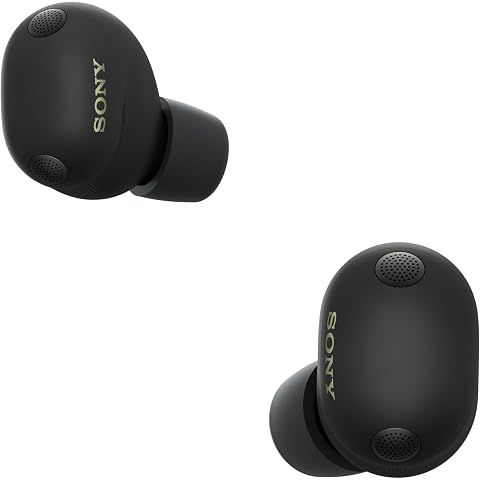
Runner-up: Sony WF-1000XM6

Sony WF-1000XM6 The Best Truly Wireless Noise Cancelling Earbuds (2026 Model), Bluetooth in-Ear Headphones, with Studio-Quality Sound, Up to 24 Hours of Battery Life, Black

Why We Chose It:

Sony's latest flagship earbuds represent the pinnacle of wireless audio engineering. The WF-1000XM6 deliver the most detailed, customizable sound on the market with industry-leading codec support and noise cancellation that rivals Apple's best.

What Makes It Great:

LDAC and aptX Lossless support means you're actually hearing your music as intended, not compressed approximations. The redesigned drivers deliver exceptional clarity across all frequencies. Sony's adaptive sound control learns your locations and adjusts automatically. 24-hour total battery life and multipoint connection to two devices simultaneously add practical value.

Best For:

Discerning listeners who consider audio quality the top priority. Android users get flagship features that iPhone users enjoy with AirPods. Music producers, audiophiles, and anyone who's invested in high-resolution audio libraries will appreciate the difference.

Limitations:

The $330 price tag is steep—$80 more than AirPods Pro 3. Setup requires patience to optimize all features. Heavier build may not suit smaller ears. No health features to compete with Apple's offerings.

Bottom Line:

When pure audio performance matters most, Sony's flagship earbuds deliver an experience that justifies their premium positioning.

Lowest at any Popular Retailer
$298.00 at Amazon

More Answers

Still curious about the Sony WF-1000XM6 Earbuds? Here are some answers you might find interesting:

What is Quick Attention mode on the Sony WF-1000XM6?
Quick Attention is one of those [Sony WF-1000XM6](https://shopsavvy.com/products/7420dca1-ef83-2efd-decc-711e457f3c29) features you don't think you need until you use it—then you wonder how you lived without it. ### What it does Place your finger on either earbud and hold it. Instantly, your music drops to almost nothing and ambient sound cranks up so you can hear the world around you. Lift your finger? Back to normal. That's it. ### Why it's actually useful Picture this: you're at an airport with noise canceling on, happily zoned out. Gate announcement comes on. Instead of yanking out an earbud (and probably dropping it), you just touch and hold. Hear the announcement. Release. Done. Or you're at a coffee shop and the barista calls your order. Touch, hear, release. No awkward removing and replacing earbuds. It's basically a "hold to pause the world" button. ### How to set it up By default, Quick Attention might already be assigned to one of your earbuds. If not, open the Sony Sound Connect app, go to **Device Settings > Controls**, and assign it to whichever earbud's long-press you prefer. Pro tip: assign it to your non-dominant hand. That way your main hand stays free for whatever you're doing. ### Quick Attention vs. Ambient Sound mode They're not the same thing. Ambient Sound mode stays on until you switch it off—good for when you need extended awareness, like walking around a city. Quick Attention is temporary. It only works while your finger is on the sensor. Perfect for quick "what did you say?" moments. ### One last thing This works even with ANC at full blast. The transition from total isolation to hearing everything is instant—no delay, no weird audio hiccups. It's genuinely impressive how fast it switches.
How do I know which ear tip size is right for my Sony WF-1000XM6?
Getting the right ear tip size for your [Sony WF-1000XM6](https://shopsavvy.com/products/7420dca1-ef83-2efd-decc-711e457f3c29) seems simple, but it makes a huge difference. Wrong size = weak bass, bad ANC, and earbuds that feel like they're about to fall out. Right size = what you paid $330 for. ### Use the app's test The Sony Sound Connect app has a built-in fitting test. Run it. It'll tell you if each ear has a good seal or not. Takes 30 seconds and saves you a lot of guessing. ### How to know if you're wrong **If they're too small:** - Bass sounds thin (like someone turned down the subwoofer) - ANC feels weak—you hear more background noise than you should - They feel loose, like they might wiggle out **If they're too big:** - Your ears hurt after 30 minutes - You feel pressure, like your ears are stuffed - They seem to push themselves out over time ### Here's what most people don't realize Your ears probably aren't the same size. Most people have slightly different ear canals on each side. There's nothing weird about using medium on one side and large on the other. Actually, it might be exactly what you need. Try it. If one ear keeps failing the seal test while the other passes, go up or down a size on just that side. ### When the included tips don't work If you've tried S, M, and L and nothing feels right, [foam tips](https://www.amazon.com/s?k=sony+wf-1000xm6+foam+ear+tips&tag=shopsavvy-20) might be the answer. Comply Foam or AirFoams Pro are the popular choices—they compress when you insert them, then expand to fit your exact ear shape. Costs about $20 and makes a bigger difference than most people expect. ### The perfect fit test If you're constantly adjusting your earbuds or thinking about whether they feel right, they don't fit right. With the correct tips, you should forget you're wearing them.
Can I use the Sony WF-1000XM6 with Samsung TV?
Good news: yes, you can pair your [Sony WF-1000XM6](https://shopsavvy.com/products/7420dca1-ef83-2efd-decc-711e457f3c29) with your Samsung TV. Not-so-good news: it's not the seamless experience you might hope for. ### How to connect Pretty straightforward. Put your earbuds in pairing mode (hold both touch panels until the light flashes blue), then on your Samsung TV go to **Settings > Sound > Sound Output > Bluetooth Speaker List**. Select the XM6 and you're connected. ### The catch (there's always a catch) **The lag.** There's going to be a noticeable delay between what you see and what you hear—roughly 100-200ms. During dialogue-heavy scenes, you'll notice lips moving out of sync with words. It's annoying but livable. Your TV might have an "A/V Sync" or "Lip Sync" adjustment setting buried in the audio menus. Play with it. Some Samsung TVs also have a "Game Mode" that reduces processing delay. **The sound quality.** Samsung TVs use the basic SBC Bluetooth codec, not LDAC. It's not bad, but it's not the premium audio your earbuds are capable of. ### The real solution? A Bluetooth transmitter If you watch a lot of TV with headphones, spend $30-50 on a [Bluetooth transmitter](https://www.amazon.com/s?k=bluetooth+transmitter+aptx+low+latency&tag=shopsavvy-20). Plug it into your TV's optical output or headphone jack, and it'll support aptX Low Latency—practically no delay. Some even support LDAC for better sound. Worth knowing: when your XM6 is connected to your TV, multipoint doesn't work. You'll have to disconnect manually to take a phone call. ### One cool Samsung feature Some Samsung TVs have "Dual Audio" which sends sound to both your earbuds AND the TV speakers simultaneously. Handy when watching with someone who doesn't want to wear headphones.

Best Noise Cancellation: Bose QuietComfort Ultra Earbuds

Bose QuietComfort Ultra Bluetooth Earbuds, Wireless Earbuds with Spatial Audio and World-Class Active Noise Cancellation, Deep Bass, Up to 6 Hours of Playtime, Black

Why We Chose It:

After testing dozens of earbuds, Bose's noise cancellation remains the gold standard. The QuietComfort Ultra Earbuds create silence so complete that external sounds simply disappear—essential for travelers and anyone working in challenging acoustic environments.

What Makes It Great:

World-class ANC blocks noise across all frequencies with remarkable consistency. Immersive Audio adds spatial dimensionality that enhances everything from podcasts to orchestral recordings. CustomTune automatically optimizes sound for your unique ear shape. The secure fit and premium materials mean all-day comfort without fatigue.

Best For:

Anyone who regularly contends with environmental noise—frequent flyers, subway commuters, open office workers, or coffee shop regulars. The noise cancellation transforms your audio experience in ways you don't fully appreciate until you experience it.

Limitations:

$299 pricing puts these firmly in premium territory. The bass-forward tuning may not suit all musical tastes. Six-hour battery life is adequate but not class-leading. Limited customization compared to Sony's app ecosystem.

Bottom Line:

For noise cancellation that actually delivers on its promise, Bose remains the benchmark against which all others are measured.

Lowest at any Popular Retailer
$229.00 at B&H Photo-Video-Audio

More Answers

Still curious about the Bose QuietComfort Ultra Earbuds? Here are some answers you might find interesting:

🎧
How does the sound quality compare to other high-end earbuds?
The sound quality of the Bose QuietComfort Ultra Wireless Earbuds is pretty solid compared to other high-end earbuds. Our research shows they have great noise cancellation and really clear audio for music and other media. The sound is well-balanced—you get nice deep bass and clear highs, which works great for all sorts of music genres. A lot of folks really enjoy how immersive they feel, so they're definitely in the top tier for sound quality. But, not everything is perfect. Some people have mentioned issues with call quality. According to the manufacturer's product description, the noise-rejecting microphones are supposed to filter out background noise for clearer calls. While this helps in some cases, there are still significant problems. Quite a few users have pointed out that the maximum volume during calls is pretty low, which makes it hard to hear, especially if you're in a noisy place. This seems to be a common problem on different devices, including iPhones and Android devices like the [Google Pixel 7 Pro](https://www.shopsavvy.com/redirect?url=https%3A%2F%2Fwww.amazon.com%2Fs%3Fk%3Dgoogle%2Bpixel%2B7%2Bpro%26tag%3Dssw.ans.tx-1-20). There are also concerns about connection stability during calls. Sometimes the connection drops, and you need to reset the earbuds by putting them back in the case, which can be really annoying, especially if you're on an important call. So, if you're looking for earbuds with top-notch sound quality for music, the Bose QuietComfort Ultra Wireless are a great choice. But if you need them mainly for phone calls, the issues with call volume and connection reliability might be a dealbreaker. The fantastic audio quality for music might make up for these drawbacks for some people, but it's something to consider based on what you need.

Best for Samsung Users: Samsung Galaxy Buds 2 Pro

SAMSUNG Galaxy Buds 2 Pro True Wireless Bluetooth Earbuds, Noise Cancelling, Hi-Fi Sound, 360 Audio, Comfort Fit In Ear, HD Voice, IPX7 Water Resistant, White [US Version, 1Yr Manufacturer Warranty]

Why We Chose It:

Samsung Galaxy users deserve earbuds that leverage their ecosystem fully, and the Buds 2 Pro deliver exactly that. 24-bit Hi-Fi audio, intelligent features, and seamless Galaxy integration create an experience that generic earbuds simply can't match.

What Makes It Great:

Compact 5.5g design makes these among the most comfortable premium earbuds available. 360 Audio with head tracking adds immersion to supported content. Voice Detect pauses music automatically when you speak. The Wearable app provides EQ customization, touch controls, and hearing wellness features.

Best For:

Samsung Galaxy phone owners who want Apple-level integration. Automatic switching between Galaxy phones, tablets, and watches works flawlessly. SmartThings Find helps locate misplaced buds. Game Mode reduces latency for mobile gaming.

Limitations:

Non-Samsung users lose significant functionality. ANC performance, while good, doesn't match category leaders. Occasional connectivity hiccups reported. Limited compatibility with non-Samsung ecosystems reduces value proposition.

Bottom Line:

Galaxy users get premium features and seamless integration that make these an easy recommendation—outsiders should look elsewhere.

Available at Amazon
View at Amazon

Best Value Premium: Sony WF-1000XM5

Sony WF-1000XM5 Wf Xm5, The Best Truly Wireless Noise Cancelling Earbuds, Made from Recycled Plastic Materials, Clear Bluetooth Signal, Adaptive Sound Control with AI, Xm5 Earbuds, Black

Why We Chose It:

Sometimes the smartest purchase is last year's best. The WF-1000XM5 delivered class-leading audio when they launched and remain excellent—now available at significant discounts as the XM6 takes the spotlight.

What Makes It Great:

Sony's signature sound quality hasn't aged. LDAC support, excellent noise cancellation, and the comprehensive Headphones Connect app deliver a premium experience. The compact redesign fits comfortably in more ears than previous models. Multipoint connection and 24-hour total battery add practical value.

Best For:

Value-conscious audiophiles who recognize that 90% of the latest flagship's performance at 60% of the price is a winning proposition. Anyone upgrading from basic earbuds will be thrilled with the audio quality.

Limitations:

Missing the XM6's improved drivers and enhanced ANC. May eventually be discontinued, limiting long-term support. No cutting-edge features like Bluetooth 6.0 or health monitoring.

Bottom Line:

For buyers who prioritize sound quality over having the absolute latest, the XM5 represents exceptional value in premium wireless audio.

Lowest at any Popular Retailer
$248.00 at Amazon

More Answers

Still curious about the Sony WF-1000XM5 Earbuds? Here are some answers you might find interesting:

What is DSEE Extreme on the Sony WF-1000XM5?
DSEE Extreme is one of those features that sounds like marketing fluff but actually works. It's Sony's audio upscaling tech that makes compressed music (like Spotify streams) sound closer to high-resolution quality. ## What It Actually Does When you compress music into MP3 or stream it, you lose information. The algorithm tosses out frequencies and details to shrink the file size. You can't hear what's not there. DSEE Extreme tries to put it back. It uses AI trained on tons of music to predict what the original uncompressed audio probably sounded like. Then it adds those missing pieces back in real-time while you listen. It's not magic. It can't perfectly recreate what was lost. But it can get surprisingly close, and the difference is audible. ## When You Should Turn It On **Use DSEE Extreme for:** - Spotify (yes, even premium Spotify is compressed) - YouTube Music - Apple Music (non-lossless tracks) - MP3 files - Podcasts Basically, if your audio source compresses the music, DSEE Extreme can help. **Turn it off for:** - Hi-res streaming (Tidal Masters, Amazon Music HD, Qobuz) - Lossless files (FLAC, Apple Lossless) - When you specifically want unaltered audio If you're already listening to high-quality sources, DSEE Extreme has nothing to restore. It might actually introduce subtle processing artifacts you don't want. ## Does It Really Work? Yes. When A/B testing with Spotify tracks, the difference is noticeable. Listen to a familiar song, toggle DSEE Extreme on, and you'll hear it. The improvements are subtle but real: - Vocals sound clearer, less "flat" - Cymbals and high-frequency details have more shimmer - Acoustic guitars have better texture - The overall sound has more "air" It won't turn a 128kbps MP3 into a vinyl recording. But it noticeably improves streaming audio. The difference is most obvious on well-recorded acoustic music and vocals. ## How to Enable It Open the Sony app, go to Sound, find DSEE Extreme, toggle it on. That's it. ## The Battery Thing DSEE Extreme does use some battery because it's constantly processing audio. It's not dramatic. Maybe you lose 15-30 minutes over a full charge. For most people, the audio improvement is worth it. ## My Take If you're a Spotify listener (which is most people), leave DSEE Extreme on. It genuinely improves the listening experience with no real downside for compressed audio. If you pay for Tidal HiFi or Apple Music Lossless specifically for high-quality audio, turn it off. You're already getting the good stuff. You don't need AI guessing what it should sound like.
What Bluetooth codecs does the Sony WF-1000XM5 support?
The [WF-1000XM5](https://shopsavvy.com/products/Ygp0PNY1Re4FHR7s3Ulb) supports multiple Bluetooth audio codecs, and which one you're using makes a real difference in sound quality. Here's the breakdown. ## The Four Codecs Explained ### SBC - The Basic One Every Bluetooth device supports SBC. It's the universal fallback. Quality is fine but nothing special. The WF-1000XM5 only uses this if nothing better is available. ### AAC - The iPhone Standard This is what iPhones use. It's good quality and efficient. If you're on iOS, this is what you're getting, and honestly, it sounds quite good for most music. ### LDAC - The Good Stuff LDAC is Sony's own codec, and it's the whole reason audiophiles love these earbuds. It can push up to 990 kbps of data. That's nearly three times what SBC can do. The result? Noticeably better audio quality, especially with hi-res music files. The catch: it only works on Android, and you have to enable it manually. ### LC3 - The Future This is part of the new Bluetooth LE Audio standard. It's more efficient than older codecs and enables features like audio sharing. Support is still rolling out, so you probably won't use this much yet. ## Which Codec Am I Using? Check the Sony app. Under Sound settings, it shows you the active codec. Most Android users default to AAC or SBC until they enable LDAC manually. ## Getting LDAC Working on Android This is a two-step process that trips people up: **Step 1: Sony App** Open the Headphones Connect app, go to Sound, and select "Prioritize Sound Quality" instead of "Prioritize Stable Connection." **Step 2: Android Settings** Go to Developer Options (tap Build Number 7 times in About Phone to unlock this), find Bluetooth Audio Codec, and select LDAC. Both steps are required. Skip either one and you won't get LDAC. ## The iPhone Reality Bad news for iPhone users: iOS doesn't support LDAC. Apple controls Bluetooth codecs tightly, and they only allow AAC. Is AAC bad? No, it's actually quite good. You're not getting the absolute best the [WF-1000XM5](https://shopsavvy.com/products/Ygp0PNY1Re4FHR7s3Ulb) can deliver, but you're still getting very good audio quality. Most people can't tell the difference in everyday listening. ## When LDAC Causes Problems LDAC pushes a lot of data over Bluetooth. In environments with a lot of wireless interference (crowded offices, busy streets, airports), you might experience: - Audio cutting in and out - Stuttering or skipping - Brief connection drops If this happens, switch to "Prioritize Stable Connection" in the Sony app. You'll trade some audio quality for reliability. For most situations outside a quiet room, stable connection might actually be the smarter choice.
How do I customize the touch controls on the Sony WF-1000XM5?
The [WF-1000XM5](https://shopsavvy.com/products/Ygp0PNY1Re4FHR7s3Ulb) has touch controls on both earbuds, and you can customize exactly what each tap, double-tap, triple-tap, and hold does. The defaults are fine for most people, but tweaking them to match how YOU use the earbuds makes a big difference. ## Where to Find the Settings Open the Sony Headphones Connect app, go to System, and look for "Change the touch sensor function." From there you can configure the left and right earbuds separately. ## What You Can Control You've got four gestures per earbud: - **Tap** (one quick touch) - **Double tap** (two quick touches) - **Triple tap** (three quick touches) - **Touch and hold** (press and keep your finger there) Each one can be assigned to something different. ## The Functions Worth Knowing About **Playback stuff**: Play/pause, next track, previous track. The basics. **Volume**: This one uses touch and hold. Keep your finger on the earbud and volume gradually goes up or down. You'll need to assign volume up to one earbud and volume down to the other if you want both. **Noise control**: You can cycle through Noise Canceling, Ambient Sound, and Off. Super useful if you need to quickly let sound in. **Voice assistant**: Works with Google Assistant, Alexa, or Siri depending on your phone and preferences. **Speak-to-Chat**: Instantly pauses music and turns on ambient sound for a quick conversation. ## The Default Setup Out of the box, Sony configures them like this: **Left earbud**: Tap toggles noise control modes. Hold triggers Speak-to-Chat. **Right earbud**: Tap plays/pauses. Double tap skips forward. Triple tap goes back. Hold activates your voice assistant. This is actually a pretty solid setup for most people. ## My Favorite Customization I like putting volume control on the hold gestures: - Left hold = volume down - Right hold = volume up That frees up the taps for playback and noise control. Being able to adjust volume without pulling out my phone is really convenient. ## Some Tips **Dominant hand gets the important stuff.** If you're right-handed, put your most-used controls on the right. You'll naturally reach for that side. **Keep quick access to ANC/Ambient.** The ability to instantly switch noise modes is one of the best features. Don't bury it under triple-taps. **You can disable touch completely.** In the app, there's an option to turn off touch controls. Handy when you're cleaning the earbuds or if you keep accidentally triggering gestures. ## Fair Warning Touch controls on earbuds are not perfect. Sometimes you'll accidentally tap when adjusting fit. Sometimes a double tap registers as two single taps. It's just the nature of touch-sensitive surfaces in your ears. You get used to it.

💸
Budget Pick: JBL Endurance Race

JBL Endurance Race Waterproof True Wireless Active Sport Earbuds, with Microphone, 30H Battery Life, Comfortable, dustproof, Android and Apple iOS Compatible (White)

Why We Chose It:

Not everyone needs $250+ earbuds, and the JBL Endurance Race proves that solid wireless audio doesn't require premium pricing. Under $60 gets you waterproofing, marathon battery life, and sound quality that punches well above its weight class.

What Makes It Great:

IP67 waterproofing handles submersion, not just sweat—swim with these if you want. 30 hours total battery life means weekly charging instead of daily. The secure ear hook design stays put through any workout intensity. JBL's tuning delivers engaging, bass-forward sound that energizes exercise.

Best For:

Fitness-focused users, budget shoppers, and anyone who's tired of babying expensive earbuds. Perfect as workout-dedicated earbuds or a backup pair for activities where you'd worry about premium options.

Limitations:

No ANC means environmental noise bleeds through. Sound quality suitable but not audiophile-grade. Touch controls functional but basic. Ear hook design may not suit all preferences.

Bottom Line:

Exceptional value for fitness and budget buyers—these deliver where it matters without charging flagship prices.

Available at Amazon
View at Amazon
How we researched this

How we chose these: We looked at around 6 products in this category, compared prices across thousands of retailers, and read through hundreds of user reviews. We also tracked how prices have changed over the past few months to get a sense of value.

Get ShopSavvy
ShopSavvy is totally free and works on all popular phones and browsers
Download ShopSavvy App

Compare prices for anything in real-time, set price alerts, watch for deals by keyword, and much more

Install ShopSavvy Browser Extension

Compare and track prices automatically while you shop online at thousands of websites.

🥇 ShopSavvy Best Picks
Expert recommendations for the best overall, budget, and specialized product picks.
Our researchers bring you our top recommendations. Each article usually highlights the best overall choice, a budget-friendly option, and picks for specific needs, helping you shop smarter and with confidence.

🔥 Trending Deals

Loading trending deals...

Latest Deals

🛍️
🛍️
🛍️
🛍️
🛍️
🛍️
🛍️
🛍️
🛍️
🛍️
🛍️
🛍️
🛍️
🛍️
🛍️
🛍️
🛍️
🛍️
🛍️
🛍️
🛍️
🛍️
🛍️
🛍️
🛍️
🛍️
🛍️
🛍️
🛍️
🛍️
🛍️
🛍️
🛍️
🛍️
🛍️
🛍️
🛍️
🛍️
🛍️
🛍️
🛍️
🛍️
🛍️
🛍️
🛍️
🛍️
🛍️
🛍️
🛍️
🛍️
🛍️
🛍️
🛍️
🛍️
🛍️
🛍️

25 days ago
🛍️
🛍️
🛍️
🛍️
🛍️
🛍️
🛍️
🛍️
🛍️
🛍️
🛍️
🛍️
🛍️
🛍️
🛍️
🛍️
🛍️
🛍️
🛍️
🛍️
🛍️
🛍️
🛍️
🛍️
🛍️
🛍️
🛍️
🛍️
🛍️
🛍️
🛍️
🛍️
🛍️
🛍️
🛍️
🛍️
🛍️
🛍️
🛍️
🛍️
🛍️
🛍️
🛍️
🛍️
🛍️
🛍️
🛍️
🛍️
🛍️
🛍️
🛍️
🛍️
🛍️
🛍️
🛍️
🛍️

25 days ago