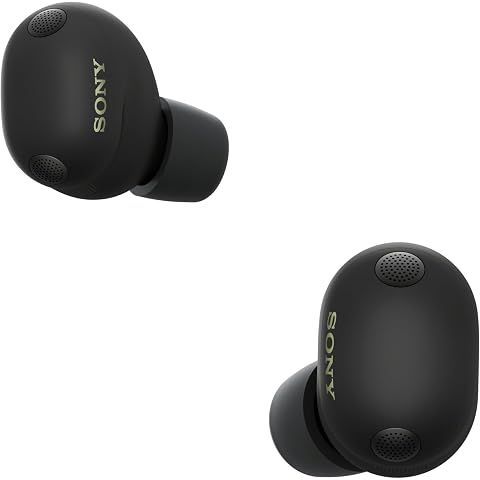
Short answer: yes, the Sony WF-1000XM6 supports LE Audio. And it's actually kind of a big deal if you care about gaming or video.
Why LE Audio matters
Traditional Bluetooth has this annoying lag—you tap jump in a game, and your character jumps a split second later. It's subtle but once you notice it, you can't un-notice it.
LE Audio fixes this. Instead of 100-200ms of delay, you're looking at 30-50ms. That's fast enough that most people won't perceive any lag.
It also uses less power (that's the "Low Energy" part), which can squeeze a bit more battery life out of your listening sessions.
Here's the catch
Your phone or computer needs to support LE Audio too. It's not just about the earbuds.
Good news if you're on Android: Most phones from 2023 onward running Android 13+ should work. Just enable "LE Audio Priority" in the Sony Sound Connect app, delete your pairing, and reconnect.
Windows users: You need Windows 11 with the 24H2 update. When pairing, choose "Bluetooth LE Audio" specifically.
iPhone users: Sorry, no LE Audio for you yet. Apple hasn't added support as of iOS 18. You can still use the XM6 just fine, but you won't get that low-latency mode.
Setting it up
It's not super intuitive, but here's the deal:
- Open the Sound Connect app
- Enable "LE Audio Priority" in settings
- Forget/delete the XM6 from your Bluetooth settings
- Pair them again fresh
After that, you should see LC3 as your active codec instead of LDAC or AAC. That's how you know it's working.
We may earn a commission when you buy through these links, at no extra cost to you. How ShopSavvy makes money
How we researched this
Where this comes from: this answer draws on the product's published specifications and the reviews ShopSavvy collected for it, alongside prices from 1 retailer in ShopSavvy's price data, most recently seen Mar 18, 2026.
📚More About Sony WF-1000XM6 Earbuds
Considering the Sony WF-1000XM6 Earbuds?
Here's our "TLDR" Review
 Download ShopSavvy App
Compare prices across tens of thousands of stores, set price alerts, watch for deals by keyword, and much more.
 Install ShopSavvy Browser Extension
Compare and track prices automatically while you shop online at thousands of websites.
More Answers
If you're still curious about the Sony WF-1000XM6 Earbuds, here are some other answers you might find interesting:
- What is Quick Attention mode on the Sony WF-1000XM6?
Quick Attention is one of those Sony WF-1000XM6 features you don't think you need until you use it—then you wonder how you lived without it. Place your finger...
- How do I know which ear tip size is right for my Sony WF-1000XM6?
Getting the right ear tip size for your Sony WF-1000XM6 seems simple, but it makes a huge difference. Wrong size = weak bass, bad ANC, and earbuds that feel...
- Can I use the Sony WF-1000XM6 with Samsung TV?
Good news: yes, you can pair your Sony WF-1000XM6 with your Samsung TV. Not-so-good news: it's not the seamless experience you might hope for. Pretty...
- Why does my Sony WF-1000XM6 show a poor seal in the app?
That "poor seal" warning in the app? One of the most common complaints about the Sony WF-1000XM6. And one of the most fixable. Here's the thing: the seal...
- What's the difference between LC3 and LDAC codecs on the Sony WF-1000XM6?
Two codecs, two completely different jobs on your Sony WF-1000XM6. Here's when to use which. LDAC is Sony's baby—a high-resolution codec that can push up to...
- Can I replace just one Sony WF-1000XM6 earbud if I lose it?
Lost one WF-1000XM6 earbud? Dropped one down a drain? Dog got to it? I feel your pain. The good news: you don't have to buy a whole new set. Call Sony Support...
- Why does the Sony WF-1000XM6 use Bluetooth 5.3 instead of Bluetooth 6?
I've seen this complaint pop up a lot: "Why doesn't the $330 WF-1000XM6 have the latest Bluetooth 6?" Fair question. Let me explain why it's not actually a big...
- What is the difference between 360 Reality Audio and 360 Upmix on the Sony WF-1000XM6?
Sony gives you two ways to get spatial audio on the WF-1000XM6, and they work completely differently. Let me clear up the confusion. This is actual 3D audio,...
- How does the Adaptive NC Optimizer work on the Sony WF-1000XM6?
Ever wonder why your noise cancellation sometimes feels incredible and other times just... okay? That's exactly the problem the Adaptive NC Optimizer is...
- Can I use the Sony WF-1000XM6 with Nintendo Switch?
Good news: yes, you can use your Sony WF-1000XM6 with your Nintendo Switch. But let me set expectations here—it's not the smoothest experience. It's pretty...




