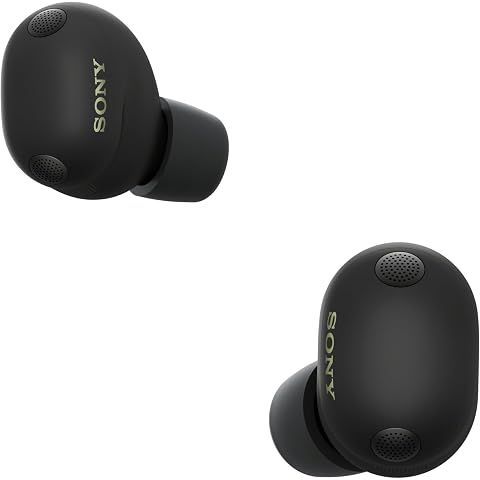
Good news: yes, you can pair your Sony WF-1000XM6 with your Samsung TV. Not-so-good news: it's not the seamless experience you might hope for.
How to connect
Pretty straightforward. Put your earbuds in pairing mode (hold both touch panels until the light flashes blue), then on your Samsung TV go to Settings > Sound > Sound Output > Bluetooth Speaker List. Select the XM6 and you're connected.
The catch (there's always a catch)
The lag. There's going to be a noticeable delay between what you see and what you hear—roughly 100-200ms. During dialogue-heavy scenes, you'll notice lips moving out of sync with words. It's annoying but livable.
Your TV might have an "A/V Sync" or "Lip Sync" adjustment setting buried in the audio menus. Play with it. Some Samsung TVs also have a "Game Mode" that reduces processing delay.
The sound quality. Samsung TVs use the basic SBC Bluetooth codec, not LDAC. It's not bad, but it's not the premium audio your earbuds are capable of.
The real solution? A Bluetooth transmitter
If you watch a lot of TV with headphones, spend $30-50 on a Bluetooth transmitter. Plug it into your TV's optical output or headphone jack, and it'll support aptX Low Latency—practically no delay. Some even support LDAC for better sound.
Worth knowing: when your XM6 is connected to your TV, multipoint doesn't work. You'll have to disconnect manually to take a phone call.
One cool Samsung feature
Some Samsung TVs have "Dual Audio" which sends sound to both your earbuds AND the TV speakers simultaneously. Handy when watching with someone who doesn't want to wear headphones.
We may earn a commission when you buy through these links, at no extra cost to you. How ShopSavvy makes money
How we researched this
Where this comes from: this answer draws on the product's published specifications and the reviews ShopSavvy collected for it, alongside prices from 1 retailer in ShopSavvy's price data, most recently seen Mar 18, 2026.
📚More About Sony WF-1000XM6 Earbuds
Considering the Sony WF-1000XM6 Earbuds?
Here's our "TLDR" Review
 Download ShopSavvy App
Compare prices across tens of thousands of stores, set price alerts, watch for deals by keyword, and much more.
 Install ShopSavvy Browser Extension
Compare and track prices automatically while you shop online at thousands of websites.
More Answers
If you're still curious about the Sony WF-1000XM6 Earbuds, here are some other answers you might find interesting:
- What is Quick Attention mode on the Sony WF-1000XM6?
Quick Attention is one of those Sony WF-1000XM6 features you don't think you need until you use it—then you wonder how you lived without it. Place your finger...
- How do I know which ear tip size is right for my Sony WF-1000XM6?
Getting the right ear tip size for your Sony WF-1000XM6 seems simple, but it makes a huge difference. Wrong size = weak bass, bad ANC, and earbuds that feel...
- Why does my Sony WF-1000XM6 show a poor seal in the app?
That "poor seal" warning in the app? One of the most common complaints about the Sony WF-1000XM6. And one of the most fixable. Here's the thing: the seal...
- What's the difference between LC3 and LDAC codecs on the Sony WF-1000XM6?
Two codecs, two completely different jobs on your Sony WF-1000XM6. Here's when to use which. LDAC is Sony's baby—a high-resolution codec that can push up to...
- Does the Sony WF-1000XM6 have LE Audio support?
Short answer: yes, the Sony WF-1000XM6 supports LE Audio. And it's actually kind of a big deal if you care about gaming or video. Traditional Bluetooth has...
- Can I replace just one Sony WF-1000XM6 earbud if I lose it?
Lost one WF-1000XM6 earbud? Dropped one down a drain? Dog got to it? I feel your pain. The good news: you don't have to buy a whole new set. Call Sony Support...
- Why does the Sony WF-1000XM6 use Bluetooth 5.3 instead of Bluetooth 6?
I've seen this complaint pop up a lot: "Why doesn't the $330 WF-1000XM6 have the latest Bluetooth 6?" Fair question. Let me explain why it's not actually a big...
- What is the difference between 360 Reality Audio and 360 Upmix on the Sony WF-1000XM6?
Sony gives you two ways to get spatial audio on the WF-1000XM6, and they work completely differently. Let me clear up the confusion. This is actual 3D audio,...
- How does the Adaptive NC Optimizer work on the Sony WF-1000XM6?
Ever wonder why your noise cancellation sometimes feels incredible and other times just... okay? That's exactly the problem the Adaptive NC Optimizer is...
- Can I use the Sony WF-1000XM6 with Nintendo Switch?
Good news: yes, you can use your Sony WF-1000XM6 with your Nintendo Switch. But let me set expectations here—it's not the smoothest experience. It's pretty...




