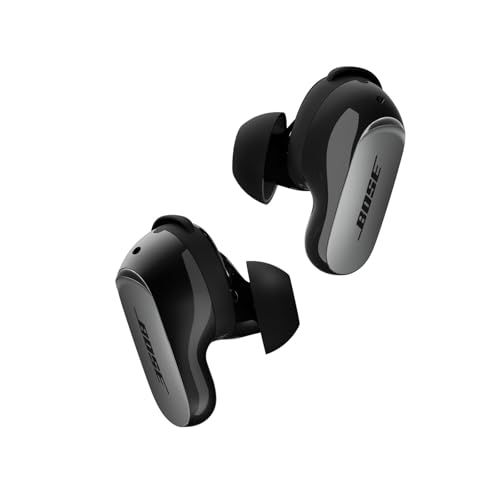
Opening the box for the first time? Here's everything you'll find inside your QuietComfort Ultra Earbuds 2nd Gen.
The Main Stuff
The earbuds — Left and right, already set up with medium ear tips and size 2 stability bands (the wings that help them stay in your ears).
The charging case — Works with wireless chargers and USB-C. Has an LED on the front to show battery status.
The Fit Kit
Bose knows everyone's ears are different, so they include options:
Ear tips — Three sizes (small, medium, large). Mediums come pre-installed. These silicone tips include rubberized guards (new in the 2nd Gen) that help keep earwax from building up on the speakers.
Stability bands — Three sizes (1, 2, 3). Size 2 is pre-installed. These concha fins hook into your ear's curve for a secure fit.
The Cable Situation
You get a short USB-A to USB-C cable—about 12 inches. Enough to reach from a laptop USB port.
What you don't get: A wall adapter. Bose assumes you have one already (you probably do). Also no USB-C to USB-C cable, so if your laptop only has USB-C, you'll need your own.
Getting the Right Fit
This matters more than you might think. The wrong fit means weaker bass and less effective noise cancellation.
Start with pre-installed sizes. If the seal feels loose or bass sounds thin, try larger tips. If earbuds feel unstable during exercise, adjust stability bands. Many people find mixing sizes works best—like large tips with medium bands.
We may earn a commission when you buy through these links, at no extra cost to you. How ShopSavvy makes money
How we researched this
Where this comes from: this answer draws on the product's published specifications and the reviews ShopSavvy collected for it, alongside prices from ShopSavvy's price data.
 Download ShopSavvy App
Compare prices across tens of thousands of stores, set price alerts, watch for deals by keyword, and much more.
 Install ShopSavvy Browser Extension
Compare and track prices automatically while you shop online at thousands of websites.
More Answers
If you're still curious about the , here are some other answers you might find interesting:
- How do the Bose QuietComfort Ultra Earbuds 2nd Gen compare to the Samsung Galaxy Buds3 Pro?
The Bose QuietComfort Ultra Earbuds 2nd Gen and Samsung Galaxy Buds3 Pro are both premium earbuds, but they're built for different priorities. Here's how they...
- What is Cinema Mode on the Bose QuietComfort Ultra Earbuds 2nd Gen?
Cinema Mode is Bose's attempt to make movies and TV shows sound like you're in an actual theater—even though you're wearing QuietComfort Ultra Earbuds 2nd Gen....
- How do the touch controls work on the Bose QuietComfort Ultra Earbuds 2nd Gen?
The QuietComfort Ultra Earbuds 2nd Gen have touch controls on both sides. Here's what you can actually do with them. Tap once — Play/pause. Also answers or...
- Are the Bose QuietComfort Ultra Earbuds 2nd Gen waterproof?
Short answer: No. But the QuietComfort Ultra Earbuds 2nd Gen handle sweat and rain just fine. These earbuds have an IPX4 rating. In plain English: they can...
- What problems and issues do users commonly report with the Bose QuietComfort Ultra Earbuds 2nd Gen?
No product is perfect. Here are the issues people actually run into with the QuietComfort Ultra Earbuds 2nd Gen—and what you can do about them. Some people...
- How long does it take to charge the Bose QuietComfort Ultra Earbuds 2nd Gen?
Planning your listening time with the QuietComfort Ultra Earbuds 2nd Gen? Here's the full picture on charging and battery life. Your earbuds get about 6 hours...
- What is ActiveSense on the Bose QuietComfort Ultra Earbuds 2nd Gen?
Most earbuds give you a simple choice: noise cancellation on, or off (transparency mode). ActiveSense on the QuietComfort Ultra Earbuds 2nd Gen makes that...
- What is SpeechClarity technology on the Bose QuietComfort Ultra Earbuds 2nd Gen?
The biggest complaint about the original QuietComfort Ultra Earbuds? Call quality. People on the other end couldn't always hear you clearly, especially in...
- Are the Bose QuietComfort Ultra Earbuds 2nd Gen compatible with Android phones?
Good news for Android users—the QuietComfort Ultra Earbuds 2nd Gen work great with your phone. And honestly, they might work better for you than AirPods would....
- How do I reset the Bose QuietComfort Ultra Earbuds 2nd Gen?
Something not working right with your QuietComfort Ultra Earbuds 2nd Gen? Before you panic, try a reset. It fixes most earbud weirdness. For everyday...




