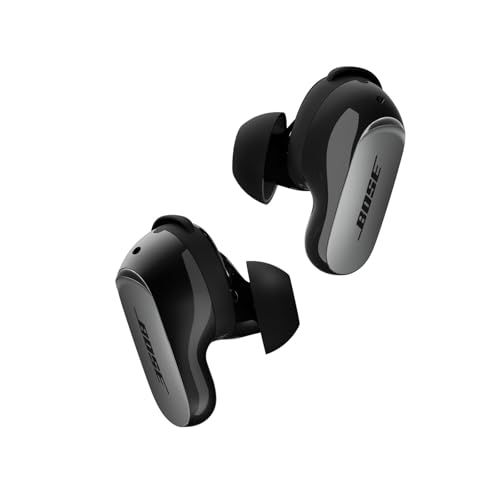
The QuietComfort Ultra Earbuds 2nd Gen have touch controls on both sides. Here's what you can actually do with them.
The Basic Moves
Tap once — Play/pause. Also answers or ends calls.
Tap twice — Skip to the next song.
Tap three times — Go back to the previous song.
Swipe up — Volume up.
Swipe down — Volume down.
Press and hold — Configurable, but by default cycles through listening modes (Quiet, Aware, Immersion).
Making Them Work Reliably
A few tips from experience:
- Tap the flat part — The touch-sensitive area is on the outside face where the Bose logo is, not the edge or tip.
- Be deliberate — Light, tentative taps don't always register. A firm tap works better.
- Keep them clean — Sweat and grime can mess with touch sensitivity.
Customizing What They Do
The Bose app lets you change what press-and-hold does for each earbud. You could set:
- Left earbud: Toggle voice assistant
- Right earbud: Cycle listening modes
Options include voice assistant, listening modes, Immersive Audio modes, play/pause, and skip track.
Turning Them Off Entirely
Accidentally triggering controls all the time? Disable touch controls completely through the app (Settings → Product Control → Toggle off).
You'll lose the convenience, but no more random pauses when adjusting your earbuds.
During Calls
Same basic controls work:
- Tap to answer/end
- Hold to reject incoming call
- Swipe for volume
We may earn a commission when you buy through these links, at no extra cost to you. How ShopSavvy makes money
How we researched this
Where this comes from: this answer draws on the product's published specifications and the reviews ShopSavvy collected for it, alongside prices from ShopSavvy's price data.
 Download ShopSavvy App
Compare prices across tens of thousands of stores, set price alerts, watch for deals by keyword, and much more.
 Install ShopSavvy Browser Extension
Compare and track prices automatically while you shop online at thousands of websites.
More Answers
If you're still curious about the , here are some other answers you might find interesting:
- How do the Bose QuietComfort Ultra Earbuds 2nd Gen compare to the Samsung Galaxy Buds3 Pro?
The Bose QuietComfort Ultra Earbuds 2nd Gen and Samsung Galaxy Buds3 Pro are both premium earbuds, but they're built for different priorities. Here's how they...
- What is Cinema Mode on the Bose QuietComfort Ultra Earbuds 2nd Gen?
Cinema Mode is Bose's attempt to make movies and TV shows sound like you're in an actual theater—even though you're wearing QuietComfort Ultra Earbuds 2nd Gen....
- Are the Bose QuietComfort Ultra Earbuds 2nd Gen waterproof?
Short answer: No. But the QuietComfort Ultra Earbuds 2nd Gen handle sweat and rain just fine. These earbuds have an IPX4 rating. In plain English: they can...
- What problems and issues do users commonly report with the Bose QuietComfort Ultra Earbuds 2nd Gen?
No product is perfect. Here are the issues people actually run into with the QuietComfort Ultra Earbuds 2nd Gen—and what you can do about them. Some people...
- What's included in the box with the Bose QuietComfort Ultra Earbuds 2nd Gen?
Opening the box for the first time? Here's everything you'll find inside your QuietComfort Ultra Earbuds 2nd Gen. The earbuds — Left and right, already set up...
- How long does it take to charge the Bose QuietComfort Ultra Earbuds 2nd Gen?
Planning your listening time with the QuietComfort Ultra Earbuds 2nd Gen? Here's the full picture on charging and battery life. Your earbuds get about 6 hours...
- What is ActiveSense on the Bose QuietComfort Ultra Earbuds 2nd Gen?
Most earbuds give you a simple choice: noise cancellation on, or off (transparency mode). ActiveSense on the QuietComfort Ultra Earbuds 2nd Gen makes that...
- What is SpeechClarity technology on the Bose QuietComfort Ultra Earbuds 2nd Gen?
The biggest complaint about the original QuietComfort Ultra Earbuds? Call quality. People on the other end couldn't always hear you clearly, especially in...
- Are the Bose QuietComfort Ultra Earbuds 2nd Gen compatible with Android phones?
Good news for Android users—the QuietComfort Ultra Earbuds 2nd Gen work great with your phone. And honestly, they might work better for you than AirPods would....
- How do I reset the Bose QuietComfort Ultra Earbuds 2nd Gen?
Something not working right with your QuietComfort Ultra Earbuds 2nd Gen? Before you panic, try a reset. It fixes most earbud weirdness. For everyday...