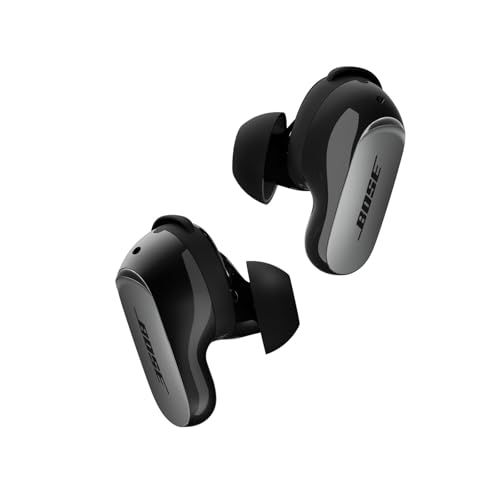
Something not working right with your QuietComfort Ultra Earbuds 2nd Gen? Before you panic, try a reset. It fixes most earbud weirdness.
The Quick Fix (Soft Reset)
For everyday glitches—connection hiccups, controls acting up, random audio issues—try this first:
- Put both earbuds in the case
- Close the lid
- Wait 5 seconds
- Open the lid
That's it. Your settings and paired devices stay intact. The earbuds just restart fresh.
The Nuclear Option (Factory Reset)
When the soft reset doesn't cut it, here's the full factory reset:
- Earbuds in case, lid closed
- Wait 30 seconds (I know, it feels long)
- Open the lid
- Hold the case button for 25 seconds straight
- Watch for: white blink → blue pulse → lights off
- Now do that two more times (yes, three times total)
After the third round, your earbuds are back to factory fresh. All your paired devices? Gone. You're starting from scratch.
After a Factory Reset
You'll need to:
- Re-pair with your phone like it's brand new
- Set things up again in the Bose app
- CustomTune will recalibrate automatically when you put them in
When Each Reset Makes Sense
Try soft reset for:
- Connection drops here and there
- Touch controls being finicky
- Momentary audio weirdness
Go factory reset for:
- Can't connect at all anymore
- One earbud completely dead
- Giving them to someone else
- Nothing else has worked
Still Broken?
Clean the charging contacts (both on earbuds and inside the case), check for firmware updates in the app, and if nothing works, contact Bose support. Your serial number is in the app under Settings → Support → Technical Info.
We may earn a commission when you buy through these links, at no extra cost to you. How ShopSavvy makes money
How we researched this
Where this comes from: this answer draws on the product's published specifications and the reviews ShopSavvy collected for it, alongside prices from ShopSavvy's price data.
 Download ShopSavvy App
Compare prices across tens of thousands of stores, set price alerts, watch for deals by keyword, and much more.
 Install ShopSavvy Browser Extension
Compare and track prices automatically while you shop online at thousands of websites.
More Answers
If you're still curious about the , here are some other answers you might find interesting:
- How do the Bose QuietComfort Ultra Earbuds 2nd Gen compare to the Samsung Galaxy Buds3 Pro?
The Bose QuietComfort Ultra Earbuds 2nd Gen and Samsung Galaxy Buds3 Pro are both premium earbuds, but they're built for different priorities. Here's how they...
- What is Cinema Mode on the Bose QuietComfort Ultra Earbuds 2nd Gen?
Cinema Mode is Bose's attempt to make movies and TV shows sound like you're in an actual theater—even though you're wearing QuietComfort Ultra Earbuds 2nd Gen....
- How do the touch controls work on the Bose QuietComfort Ultra Earbuds 2nd Gen?
The QuietComfort Ultra Earbuds 2nd Gen have touch controls on both sides. Here's what you can actually do with them. Tap once — Play/pause. Also answers or...
- Are the Bose QuietComfort Ultra Earbuds 2nd Gen waterproof?
Short answer: No. But the QuietComfort Ultra Earbuds 2nd Gen handle sweat and rain just fine. These earbuds have an IPX4 rating. In plain English: they can...
- What problems and issues do users commonly report with the Bose QuietComfort Ultra Earbuds 2nd Gen?
No product is perfect. Here are the issues people actually run into with the QuietComfort Ultra Earbuds 2nd Gen—and what you can do about them. Some people...
- What's included in the box with the Bose QuietComfort Ultra Earbuds 2nd Gen?
Opening the box for the first time? Here's everything you'll find inside your QuietComfort Ultra Earbuds 2nd Gen. The earbuds — Left and right, already set up...
- How long does it take to charge the Bose QuietComfort Ultra Earbuds 2nd Gen?
Planning your listening time with the QuietComfort Ultra Earbuds 2nd Gen? Here's the full picture on charging and battery life. Your earbuds get about 6 hours...
- What is ActiveSense on the Bose QuietComfort Ultra Earbuds 2nd Gen?
Most earbuds give you a simple choice: noise cancellation on, or off (transparency mode). ActiveSense on the QuietComfort Ultra Earbuds 2nd Gen makes that...
- What is SpeechClarity technology on the Bose QuietComfort Ultra Earbuds 2nd Gen?
The biggest complaint about the original QuietComfort Ultra Earbuds? Call quality. People on the other end couldn't always hear you clearly, especially in...
- Are the Bose QuietComfort Ultra Earbuds 2nd Gen compatible with Android phones?
Good news for Android users—the QuietComfort Ultra Earbuds 2nd Gen work great with your phone. And honestly, they might work better for you than AirPods would....




