How do the Bose QuietComfort Ultra Earbuds 2nd Gen compare to the Samsung Galaxy Buds3 Pro?

Published: March 30th, 2026
2 min read
Recently Updated: March 30th, 2026
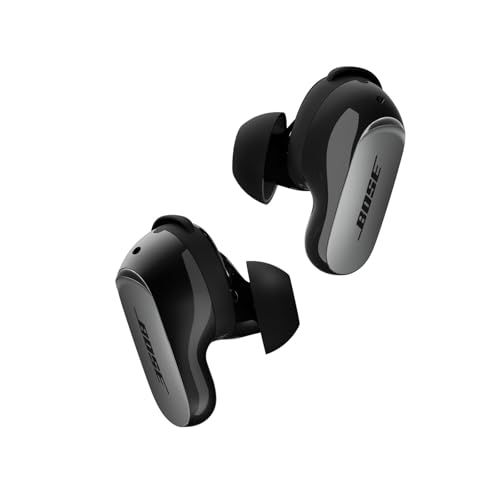
Bose QuietComfort Ultra Wireless Noise Cancelling Earbuds (2nd Gen, Black)
Watch products with ShopSavvy for price drops, stock alerts, deals and more.

nullThe Bose QuietComfort Ultra Earbuds 2nd Gen and Samsung Galaxy Buds3 Pro are both premium earbuds, but they're built for different priorities. Here's how they actually compare.

The Price Situation

Bose costs $299. Samsung lists at $249 but goes on sale more often. If budget matters, Samsung has the edge.

Noise Cancellation: Bose Wins

This isn't close. Bose makes some of the best ANC on the market, and these earbuds continue that tradition. If blocking out the world is your main goal, get the Bose.

Samsung's noise cancellation is good, but it's not in the same league.

Sound Quality: Depends What You Like

Bose sounds warmer and more bass-forward. If you like that punchy, full sound (most people do), Bose delivers.

Samsung is more neutral and balanced. Audiophile types might prefer this, but it can sound less exciting to casual listeners.

Both let you tweak EQ in their apps. Samsung supports fancier codecs with Samsung phones.

Fit: Samsung is Smaller

The Bose earbuds are chunky. They have stability bands that help keep them in place, which is great for exercise, but they're just... big. If you have small ears, they might not fit comfortably.

Samsung went with a more traditional, slimmer design. Most people find them more comfortable for long listening sessions.

Battery Life: Samsung Wins

Samsung gets about 7 hours with ANC on; Bose gets 6 (or 4 with Immersive Audio). The Samsung case also holds more total charge.

Call Quality: Bose Wins

Bose put real effort into SpeechClarity for the 2nd Gen, and it shows. If you're on calls a lot, especially in noisy places, Bose handles it better.

Water Resistance: Samsung Wins

Samsung's IP57 rating beats Bose's IPX4. You could briefly submerge the Samsung earbuds accidentally; Bose are just splash-proof.

The Bottom Line

Get the Bose if: Noise cancellation and call quality are your priorities.

Get the Samsung if: You want smaller earbuds, longer battery, or have a Samsung phone.

How we researched this

Where this comes from: This answer is based on ShopSavvy's product database, real-time pricing from thousands of retailers, and a look at hundreds of user reviews to give you a well-rounded picture.

Considering the ?

Here's our "TLDR" Review

Get ShopSavvy
ShopSavvy is totally free and works on all popular phones and browsers
Download ShopSavvy AppDownload ShopSavvy App

Compare prices for anything in real-time, set price alerts, watch for deals by keyword, and much more

Install ShopSavvy Browser ExtensionInstall ShopSavvy Browser Extension

Compare and track prices automatically while you shop online at thousands of websites.

More Answers

If you're still curious about the , here are some other answers you might find interesting:

What is Cinema Mode on the Bose QuietComfort Ultra Earbuds 2nd Gen?

Published: March 30th, 2026
Recently Updated: March 30th, 2026

Cinema Mode is Bose's attempt to make movies and TV shows sound like you're in an actual theaterโ€”even though you're wearing QuietComfort Ultra Earbuds 2nd Gen.

What It Does

Regular earbuds give you stereo sound: left and right channels, music positioned between your ears. Cinema Mode processes that stereo signal to simulate sound coming from all around you, like a surround sound setup.

It's different from the regular Immersive Audio modes (Still and Motion), which are designed for music. Cinema Mode is specifically tuned for video contentโ€”dialogue, sound effects, and ambient audio.

When to Use It

Great for:

  • Watching movies on your phone during flights
  • Netflix binges on your tablet
  • YouTube videos with good audio production
  • Gaming on mobile

Probably skip it for:

  • Music (use regular Immersive Audio instead)
  • Podcasts (won't make much difference)
  • Casual listening

How to Turn It On

Open the Bose app, find the Immersive Audio section, and select Cinema Mode. You can also set up a shortcut on your earbuds to switch modes without pulling out your phone.

The Battery Trade-Off

Like all Immersive Audio features, Cinema Mode uses extra batteryโ€”about 4 hours instead of 6. Worth it for a movie? Probably. For a quick YouTube video? Maybe leave it off.

2nd Gen Only

This is a hardware feature specific to the 2nd Gen. If you have the original QuietComfort Ultra Earbuds, no firmware update will add thisโ€”you'd need the newer model.

Read More

How do the touch controls work on the Bose QuietComfort Ultra Earbuds 2nd Gen?

Published: March 30th, 2026
Recently Updated: March 30th, 2026

The QuietComfort Ultra Earbuds 2nd Gen have touch controls on both sides. Here's what you can actually do with them.

The Basic Moves

Tap once โ€” Play/pause. Also answers or ends calls.

Tap twice โ€” Skip to the next song.

Tap three times โ€” Go back to the previous song.

Swipe up โ€” Volume up.

Swipe down โ€” Volume down.

Press and hold โ€” Configurable, but by default cycles through listening modes (Quiet, Aware, Immersion).

Making Them Work Reliably

A few tips from experience:

  • Tap the flat part โ€” The touch-sensitive area is on the outside face where the Bose logo is, not the edge or tip.
  • Be deliberate โ€” Light, tentative taps don't always register. A firm tap works better.
  • Keep them clean โ€” Sweat and grime can mess with touch sensitivity.

Customizing What They Do

The Bose app lets you change what press-and-hold does for each earbud. You could set:

  • Left earbud: Toggle voice assistant
  • Right earbud: Cycle listening modes

Options include voice assistant, listening modes, Immersive Audio modes, play/pause, and skip track.

Turning Them Off Entirely

Accidentally triggering controls all the time? Disable touch controls completely through the app (Settings โ†’ Product Control โ†’ Toggle off).

You'll lose the convenience, but no more random pauses when adjusting your earbuds.

During Calls

Same basic controls work:

  • Tap to answer/end
  • Hold to reject incoming call
  • Swipe for volume
Read More

Are the Bose QuietComfort Ultra Earbuds 2nd Gen waterproof?

Published: March 30th, 2026
Recently Updated: March 30th, 2026

Short answer: No. But the QuietComfort Ultra Earbuds 2nd Gen handle sweat and rain just fine.

What IPX4 Actually Means

These earbuds have an IPX4 rating. In plain English: they can handle sweat, light rain, and splashes. They cannot handle being submerged in water.

No swimming, no showering with them in, and don't drop them in the toilet. But for workouts? You're good.

What You CAN Do

โœ… Gym workouts (even sweaty ones) โœ… Running in light rain โœ… Spin class โœ… Walking in humid weather โœ… Getting caught in a drizzle

What You Should NOT Do

โŒ Swimming โŒ Showering โŒ Getting caught in heavy rain โŒ Beach activities (saltwater is especially bad) โŒ Hot tubs

Important: The Case Isn't Protected

This trips people upโ€”the earbuds have water resistance, but the case has zero protection. Keep that case dry.

After a Sweaty Workout

Take care of them:

  1. Wipe down with a dry cloth
  2. Let them air dry before putting in the case
  3. Clean ear tips occasionally with a little soap and water (remove them first)

How They Compare

The AirPods Pro 3 and Samsung Galaxy Buds3 Pro both have IP57 ratings, which is better water protection. If you need to work out in the rain regularly, those might be worth considering.

For most people doing normal gym workouts? IPX4 is plenty.

Read More

No product is perfect. Here are the issues people actually run into with the QuietComfort Ultra Earbuds 2nd Genโ€”and what you can do about them.

The Stuff You Might Notice

White Noise in Silence

Some people hear a faint hiss when noise cancellation is on but no music is playing. This happens with pretty much all ANC earbudsโ€”it's just how the technology works. There's no fix because it's not really a "bug."

The Stability Band Problem

Those wing things (stability bands) sometimes spin around and get wedged weird in the case. Annoying, but not a big deal. Just make sure the notches line up when you put them in.

Too Big for Small Ears

If you have smaller ears, these might just not fit well. They're chunky earbuds. Even the smallest tips and bands won't work for everyone.

Random Disconnects When Still

Watching a movie in bed and they just disconnect? Some users report this. The earbuds think you've stopped using them. Moving your head slightly every now and then seems to prevent it.

Crackling Sounds

Usually means dust or debris got in the microphone holes. Clean them gently with a soft brush. More common if you use them during workouts.

Connection Issues

Sometimes they just won't connect right. Try the usual: remove from Bluetooth list, factory reset, update firmware.

What's Normal vs What's a Problem

Battery life of 5.5 hours instead of 6? Normal. That's how advertised specs work.

One earbud not charging at all? Problem. Clean the contacts, try a reset, contact Bose if it persists.

When to Actually Worry

Most issues have simple fixes. If something keeps happening after the basics (cleaning, resetting, updating), contact Bose support. Your serial number is in the app under Settings โ†’ Support.

Read More

What's included in the box with the Bose QuietComfort Ultra Earbuds 2nd Gen?

Published: March 30th, 2026
Recently Updated: March 30th, 2026

Opening the box for the first time? Here's everything you'll find inside your QuietComfort Ultra Earbuds 2nd Gen.

The Main Stuff

The earbuds โ€” Left and right, already set up with medium ear tips and size 2 stability bands (the wings that help them stay in your ears).

The charging case โ€” Works with wireless chargers and USB-C. Has an LED on the front to show battery status.

The Fit Kit

Bose knows everyone's ears are different, so they include options:

Ear tips โ€” Three sizes (small, medium, large). Mediums come pre-installed. These silicone tips include rubberized guards (new in the 2nd Gen) that help keep earwax from building up on the speakers.

Stability bands โ€” Three sizes (1, 2, 3). Size 2 is pre-installed. These concha fins hook into your ear's curve for a secure fit.

The Cable Situation

You get a short USB-A to USB-C cableโ€”about 12 inches. Enough to reach from a laptop USB port.

What you don't get: A wall adapter. Bose assumes you have one already (you probably do). Also no USB-C to USB-C cable, so if your laptop only has USB-C, you'll need your own.

Getting the Right Fit

This matters more than you might think. The wrong fit means weaker bass and less effective noise cancellation.

Start with pre-installed sizes. If the seal feels loose or bass sounds thin, try larger tips. If earbuds feel unstable during exercise, adjust stability bands. Many people find mixing sizes works bestโ€”like large tips with medium bands.

Read More

How long does it take to charge the Bose QuietComfort Ultra Earbuds 2nd Gen?

Published: March 30th, 2026
Recently Updated: March 30th, 2026

Planning your listening time with the QuietComfort Ultra Earbuds 2nd Gen? Here's the full picture on charging and battery life.

The Quick Answer

Your earbuds get about 6 hours of playtime (4 with Immersive Audio). The case holds another 18 hours worth of charges, giving you roughly 24 hours total before everything needs a plug.

Charging Speeds

Earbuds in the case: About an hour from dead to full. But here's the useful bitโ€”just 20 minutes gives you 2 hours of listening. Perfect for when you're running out the door.

The case itself:

  • USB-C wired: About 2 hours
  • Wireless charging: About 3 hours

Wireless is convenient, but wired is faster when you need it.

What the Lights Mean

The LED on the case tells you what's happening:

  • Glowing amber: Charging
  • Green: Done
  • Blinking amber: Case battery is low

When you open the case with earbuds inside:

  • Solid white: Earbuds are charged
  • Pulsing white: Earbuds are still charging

Making Your Battery Last Longer

A few practical tips:

  • Immersive Audio cuts battery from 6 hours to 4. Turn it off when you don't need it.
  • Keep earbuds in the case when not using themโ€”they stay charged and ready.
  • Wipe charging contacts occasionally. Dirty contacts = slow or no charging.

Real-World Battery Life

Bose says 6 hours, and testing usually shows around 5.5 hours in practice. That's normalโ€”volume level and features used affect it. Most people find it's plenty for a workday or long flight.

Read More

What is ActiveSense on the Bose QuietComfort Ultra Earbuds 2nd Gen?

Published: March 30th, 2026
Recently Updated: March 30th, 2026

Most earbuds give you a simple choice: noise cancellation on, or off (transparency mode). ActiveSense on the QuietComfort Ultra Earbuds 2nd Gen makes that choice smarter.

The Basic Idea

Think of it as transparency mode with a brain. Instead of just letting all external sound through, ActiveSense listens to your environment and makes decisions about what you probably want to hear.

Sustained background noise like train rumble or air conditioning? It reduces that. Sudden important sounds like someone calling your name or a car horn? Those come through clearly.

How It Fits With the Other Modes

Your earbuds have three main listening modes:

Quiet Mode โ€” Full noise cancellation. The world goes quiet. Best for focus.

Aware Mode (with ActiveSense) โ€” This is where the smart stuff happens. You hear your surroundings, but the earbuds smooth out the experience.

Immersion Mode โ€” Full ANC plus Bose's spatial audio effect. Maximum immersion.

When ActiveSense Helps Most

Walking in the city: Hear traffic and people around you without every car engine at full volume.

On public transit: Hear announcements clearly while constant train rumble gets dialed down.

At the office: Notice when someone's trying to get your attention without constant HVAC drone.

At home: Hear the doorbell or kids calling without every household sound competing with your music.

Switching Modes

Press and hold the touch-sensitive area on either earbud to cycle through modes. Or use the Bose app for more control. You can set up shortcuts so left and right earbuds do different things.

Read More

What is SpeechClarity technology on the Bose QuietComfort Ultra Earbuds 2nd Gen?

Published: March 30th, 2026
Recently Updated: March 30th, 2026

The biggest complaint about the original QuietComfort Ultra Earbuds? Call quality. People on the other end couldn't always hear you clearly, especially in noisy places. Bose fixed that with SpeechClarity on the 2nd Gen.

What It Actually Does

SpeechClarity is a smart filter for your voice. When you're on a call, the earbuds use AI to figure out what's your voice and what's background noiseโ€”then suppress the "everything else."

The tech behind it is impressive: eight microphones working together, plus bone conduction sensors that detect the vibrations of your actual speech. That combination helps the system know with confidence what's you talking versus what's a coffee shop or traffic.

Does It Work?

From user reports? Yes, significantly. People who upgraded specifically for better call quality say the difference is noticeable. Callers hear less background noise, voices come through clearer, and even wind is handled better (though strong wind still causes issuesโ€”that's just physics).

If you work from home and take video calls, or you're often on the phone in public spaces, this is a meaningful improvement.

Where It Shines

  • Video calls with background noise in your house
  • Phone calls at coffee shops or airports
  • Walking outside on mildly windy days
  • Any situation where the old earbuds made people say "you're breaking up"

Where It Still Struggles

No earbuds handle extreme wind perfectly. If it's really blowing, you're going to have issues regardless of how good the tech is. Also, Bluetooth has bandwidth limitations that affect voice quality on any wireless device.

The Bottom Line

If call quality was the one thing holding you back from the original model, SpeechClarity specifically addresses that complaint. Users who upgraded for this feature generally report it was worth it.

Read More

Are the Bose QuietComfort Ultra Earbuds 2nd Gen compatible with Android phones?

Published: March 30th, 2026
Recently Updated: March 30th, 2026

Good news for Android usersโ€”the QuietComfort Ultra Earbuds 2nd Gen work great with your phone. And honestly, they might work better for you than AirPods would.

Everything Works

Unlike some premium earbuds that feel like they were made for iPhones first, these Bose earbuds treat Android as a first-class citizen. All the features work:

  • Full noise cancellation? Check.
  • Immersive Audio spatial sound? Check.
  • CustomTune ear calibration? Check.
  • Multipoint to connect two devices? Check.
  • Customizable touch controls? Check.

You're not missing out on anything.

The Bose App

The Bose Music app on Android does everything the iOS version does:

  • Update firmware
  • Tweak the EQ
  • Customize touch controls
  • Switch between listening modes
  • Check battery levels

It's not a watered-down version. It's the real deal.

Where Android Actually Wins

Here's something interesting: if you have a newer Android phone with a Qualcomm Snapdragon chip (8 Gen 3 or newer), you get access to aptX Adaptive. That's a high-quality audio codec that iPhones can't use.

Plus, Google Fast Pair worksโ€”just open the case near your phone and it prompts you to connect.

The AirPods Comparison

AirPods are great... if you have an iPhone. On Android, you lose features like spatial audio and automatic ear detection. These Bose earbuds don't have that problem. Everything works everywhere.

One Small Thing

Some users have reported occasional quirks with the Bose app on certain Samsung phones. Bose keeps updating the app to fix these issues. The earbuds themselves work fineโ€”it's just some app features that can be inconsistent on specific models.

Read More

How do I reset the Bose QuietComfort Ultra Earbuds 2nd Gen?

Published: March 30th, 2026
Recently Updated: March 30th, 2026

Something not working right with your QuietComfort Ultra Earbuds 2nd Gen? Before you panic, try a reset. It fixes most earbud weirdness.

The Quick Fix (Soft Reset)

For everyday glitchesโ€”connection hiccups, controls acting up, random audio issuesโ€”try this first:

  1. Put both earbuds in the case
  2. Close the lid
  3. Wait 5 seconds
  4. Open the lid

That's it. Your settings and paired devices stay intact. The earbuds just restart fresh.

The Nuclear Option (Factory Reset)

When the soft reset doesn't cut it, here's the full factory reset:

  1. Earbuds in case, lid closed
  2. Wait 30 seconds (I know, it feels long)
  3. Open the lid
  4. Hold the case button for 25 seconds straight
  5. Watch for: white blink โ†’ blue pulse โ†’ lights off
  6. Now do that two more times (yes, three times total)

After the third round, your earbuds are back to factory fresh. All your paired devices? Gone. You're starting from scratch.

After a Factory Reset

You'll need to:

  • Re-pair with your phone like it's brand new
  • Set things up again in the Bose app
  • CustomTune will recalibrate automatically when you put them in

When Each Reset Makes Sense

Try soft reset for:

  • Connection drops here and there
  • Touch controls being finicky
  • Momentary audio weirdness

Go factory reset for:

  • Can't connect at all anymore
  • One earbud completely dead
  • Giving them to someone else
  • Nothing else has worked

Still Broken?

Clean the charging contacts (both on earbuds and inside the case), check for firmware updates in the app, and if nothing works, contact Bose support. Your serial number is in the app under Settings โ†’ Support โ†’ Technical Info.

Read More
๐Ÿ’ฌ ShopSavvy Answers
Expertly researched answers to specific questions about products you're interested in.
Our team of dedicated researchers sources and verifies information on everything you've been asking about like compatibility, durability, hidden features, and much more, helping you make informed decisions with confidence.

๐Ÿ”ฅ Trending Deals

Loading trending deals...

Latest Deals

๐Ÿ›๏ธ
๐Ÿ›๏ธ
๐Ÿ›๏ธ
๐Ÿ›๏ธ
๐Ÿ›๏ธ
๐Ÿ›๏ธ
๐Ÿ›๏ธ
๐Ÿ›๏ธ
๐Ÿ›๏ธ
๐Ÿ›๏ธ
๐Ÿ›๏ธ
๐Ÿ›๏ธ
๐Ÿ›๏ธ
๐Ÿ›๏ธ
๐Ÿ›๏ธ
๐Ÿ›๏ธ
๐Ÿ›๏ธ
๐Ÿ›๏ธ
๐Ÿ›๏ธ
๐Ÿ›๏ธ
๐Ÿ›๏ธ
๐Ÿ›๏ธ
๐Ÿ›๏ธ
๐Ÿ›๏ธ
๐Ÿ›๏ธ
๐Ÿ›๏ธ
๐Ÿ›๏ธ
๐Ÿ›๏ธ
๐Ÿ›๏ธ
๐Ÿ›๏ธ
๐Ÿ›๏ธ
๐Ÿ›๏ธ
๐Ÿ›๏ธ
๐Ÿ›๏ธ
๐Ÿ›๏ธ
๐Ÿ›๏ธ
๐Ÿ›๏ธ
๐Ÿ›๏ธ
๐Ÿ›๏ธ
๐Ÿ›๏ธ
๐Ÿ›๏ธ
๐Ÿ›๏ธ
๐Ÿ›๏ธ
๐Ÿ›๏ธ
๐Ÿ›๏ธ
๐Ÿ›๏ธ
๐Ÿ›๏ธ
๐Ÿ›๏ธ
๐Ÿ›๏ธ
๐Ÿ›๏ธ
๐Ÿ›๏ธ
๐Ÿ›๏ธ
๐Ÿ›๏ธ
๐Ÿ›๏ธ
๐Ÿ›๏ธ
๐Ÿ›๏ธ

a month ago
๐Ÿ›๏ธ
๐Ÿ›๏ธ
๐Ÿ›๏ธ
๐Ÿ›๏ธ
๐Ÿ›๏ธ
๐Ÿ›๏ธ
๐Ÿ›๏ธ
๐Ÿ›๏ธ
๐Ÿ›๏ธ
๐Ÿ›๏ธ
๐Ÿ›๏ธ
๐Ÿ›๏ธ
๐Ÿ›๏ธ
๐Ÿ›๏ธ
๐Ÿ›๏ธ
๐Ÿ›๏ธ
๐Ÿ›๏ธ
๐Ÿ›๏ธ
๐Ÿ›๏ธ
๐Ÿ›๏ธ
๐Ÿ›๏ธ
๐Ÿ›๏ธ
๐Ÿ›๏ธ
๐Ÿ›๏ธ
๐Ÿ›๏ธ
๐Ÿ›๏ธ
๐Ÿ›๏ธ
๐Ÿ›๏ธ
๐Ÿ›๏ธ
๐Ÿ›๏ธ
๐Ÿ›๏ธ
๐Ÿ›๏ธ
๐Ÿ›๏ธ
๐Ÿ›๏ธ
๐Ÿ›๏ธ
๐Ÿ›๏ธ
๐Ÿ›๏ธ
๐Ÿ›๏ธ
๐Ÿ›๏ธ
๐Ÿ›๏ธ
๐Ÿ›๏ธ
๐Ÿ›๏ธ
๐Ÿ›๏ธ
๐Ÿ›๏ธ
๐Ÿ›๏ธ
๐Ÿ›๏ธ
๐Ÿ›๏ธ
๐Ÿ›๏ธ
๐Ÿ›๏ธ
๐Ÿ›๏ธ
๐Ÿ›๏ธ
๐Ÿ›๏ธ
๐Ÿ›๏ธ
๐Ÿ›๏ธ
๐Ÿ›๏ธ
๐Ÿ›๏ธ

a month ago



