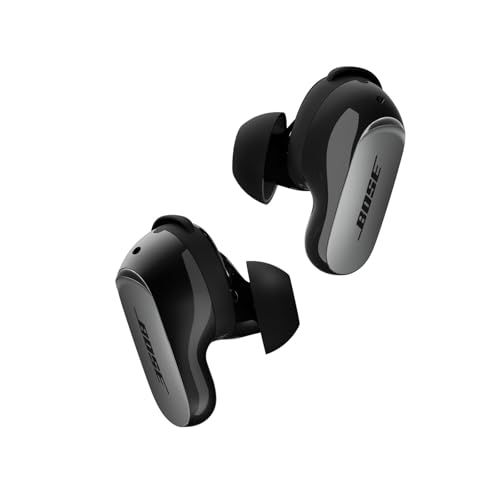
You might have noticed your earbuds play a quick sound every time you put them in. That's CustomTune doing its thing—and it's actually pretty clever technology.
What's Actually Happening
Everyone's ears are shaped differently. Like, really differently. And that affects how sound reaches your eardrum. What sounds perfect for one person might be bass-heavy or tinny for someone else, even with the exact same earbuds.
Bose's solution? Measure your specific ears and adjust accordingly.
The Quick Science
When you pop in the QuietComfort Ultra Earbuds 2nd Gen, you'll hear a brief tone—just a second or two. During that moment, tiny microphones inside the earbuds measure how that sound bounces around your ear canal. Then the earbuds adjust their output to compensate for your unique ear shape.
It's like having a sound engineer fine-tune your audio setup, except it happens automatically every time you use them.
What Gets Adjusted
Sound Quality: The frequency response changes to deliver balanced bass, mids, and treble specifically for your ears. What the engineers intended you to hear is what you actually get.
Noise Cancellation: The seal between your ear tips and ear canal matters a lot for ANC. CustomTune measures that seal and optimizes the noise cancellation to work with whatever fit you have.
Transparency Mode: Even the Aware mode gets tweaked so external sounds come through naturally.
Getting the Best Results
The calibration is only as good as your fit. Make sure you've got the right ear tip and stability band sizes before you start. If things sound off, try a different size and let CustomTune recalibrate—it happens automatically each time you insert the earbuds.
Pro tip: A quiet environment helps the calibration work better, though it's usually fine in most normal conditions.
We may earn a commission when you buy through these links, at no extra cost to you. How ShopSavvy makes money
How we researched this
Where this comes from: this answer draws on the product's published specifications and the reviews ShopSavvy collected for it, alongside prices from ShopSavvy's price data.
 Download ShopSavvy App
Compare prices across tens of thousands of stores, set price alerts, watch for deals by keyword, and much more.
 Install ShopSavvy Browser Extension
Compare and track prices automatically while you shop online at thousands of websites.
More Answers
If you're still curious about the , here are some other answers you might find interesting:
- How do the Bose QuietComfort Ultra Earbuds 2nd Gen compare to the Samsung Galaxy Buds3 Pro?
The Bose QuietComfort Ultra Earbuds 2nd Gen and Samsung Galaxy Buds3 Pro are both premium earbuds, but they're built for different priorities. Here's how they...
- What is Cinema Mode on the Bose QuietComfort Ultra Earbuds 2nd Gen?
Cinema Mode is Bose's attempt to make movies and TV shows sound like you're in an actual theater—even though you're wearing QuietComfort Ultra Earbuds 2nd Gen....
- How do the touch controls work on the Bose QuietComfort Ultra Earbuds 2nd Gen?
The QuietComfort Ultra Earbuds 2nd Gen have touch controls on both sides. Here's what you can actually do with them. Tap once — Play/pause. Also answers or...
- Are the Bose QuietComfort Ultra Earbuds 2nd Gen waterproof?
Short answer: No. But the QuietComfort Ultra Earbuds 2nd Gen handle sweat and rain just fine. These earbuds have an IPX4 rating. In plain English: they can...
- What problems and issues do users commonly report with the Bose QuietComfort Ultra Earbuds 2nd Gen?
No product is perfect. Here are the issues people actually run into with the QuietComfort Ultra Earbuds 2nd Gen—and what you can do about them. Some people...
- What's included in the box with the Bose QuietComfort Ultra Earbuds 2nd Gen?
Opening the box for the first time? Here's everything you'll find inside your QuietComfort Ultra Earbuds 2nd Gen. The earbuds — Left and right, already set up...
- How long does it take to charge the Bose QuietComfort Ultra Earbuds 2nd Gen?
Planning your listening time with the QuietComfort Ultra Earbuds 2nd Gen? Here's the full picture on charging and battery life. Your earbuds get about 6 hours...
- What is ActiveSense on the Bose QuietComfort Ultra Earbuds 2nd Gen?
Most earbuds give you a simple choice: noise cancellation on, or off (transparency mode). ActiveSense on the QuietComfort Ultra Earbuds 2nd Gen makes that...
- What is SpeechClarity technology on the Bose QuietComfort Ultra Earbuds 2nd Gen?
The biggest complaint about the original QuietComfort Ultra Earbuds? Call quality. People on the other end couldn't always hear you clearly, especially in...
- Are the Bose QuietComfort Ultra Earbuds 2nd Gen compatible with Android phones?
Good news for Android users—the QuietComfort Ultra Earbuds 2nd Gen work great with your phone. And honestly, they might work better for you than AirPods would....