✈️

Can I use these headphones on airplanes?

Published: January 20th, 2026
2 min read
Last Updated: January 20th, 2026
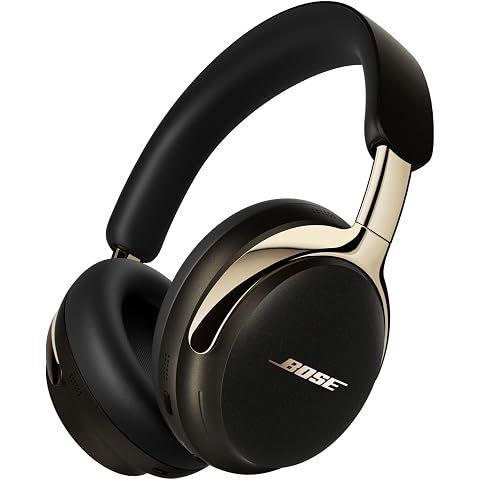
Bose New QuietComfort Ultra Bluetooth Headphones (2nd Gen), Wireless Headphones with Spatial Audio, Over Ear Noise Cancelling with Mic, Up to 30 Hours of Play time, Desert Gold - Limited Edition Color
Watch products with ShopSavvy for price drops, stock alerts, deals and more.

The Bose QuietComfort Ultra (2nd Gen) excels in airplane environments—arguably the use case where premium noise-cancelling headphones deliver the most dramatic benefit.

Flight Performance

Engine Noise: The industry-leading ANC effectively eliminates the constant low-frequency drone of jet engines. Many travelers describe arriving at destinations less fatigued due to reduced noise exposure.

Battery Life by Flight Type:

| Flight | Duration | Battery Remaining | |--------|----------|-------------------| | Domestic | 2-5 hours | 25+ hours | | Transatlantic | 7-10 hours | 20+ hours | | Long-haul | 17-18 hours | 12+ hours | | Ultra long-haul | 19-22 hours | 8+ hours |

Connectivity for In-Flight Entertainment

| Method | Use Case | Cable | |--------|----------|-------| | 3.5mm analog | Standard seatback screens | Included | | USB-C digital | Newer aircraft ports | Included | | Dual-prong adapter | Legacy airline jacks | Not included |

Purchase a $5-10 dual-prong adapter for your travel kit—many airlines still use these connectors.

Practical Travel Features

Aware Mode: Quickly hear announcements without removing headphones—hold the control button.

Extended Comfort: Lightweight design (~250g) with plush padding suitable for 10+ hour wear, including sleeping.

Pressure-Neutral: Unlike in-ear ANC earbuds, over-ear headphones don't create uncomfortable seal pressure during altitude changes.

Real-World Reports

Frequent travelers consistently cite the ANC performance on flights as the primary purchase motivation. The reduction in ambient noise contributes to arriving less fatigued—a practical benefit beyond entertainment value.

How we researched this

Where this comes from: This answer is based on ShopSavvy's product database, real-time pricing from thousands of retailers, and a look at hundreds of user reviews to give you a well-rounded picture.

Considering the ?

Here's our "TLDR" Review

Get ShopSavvy
ShopSavvy is totally free and works on all popular phones and browsers
Download ShopSavvy AppDownload ShopSavvy App

Compare prices for anything in real-time, set price alerts, watch for deals by keyword, and much more

Install ShopSavvy Browser ExtensionInstall ShopSavvy Browser Extension

Compare and track prices automatically while you shop online at thousands of websites.

More Answers

If you're still curious about the , here are some other answers you might find interesting:

💰

Is it worth upgrading from the original QuietComfort Ultra to the 2nd Gen?

Published: January 20th, 2026
Last Updated: January 20th, 2026

For current QuietComfort Ultra (1st Gen) owners, the 2nd Gen offers incremental improvements that won't justify the $449 cost for most users.

Improvement Summary

| Feature | 1st Gen | 2nd Gen | Worth Upgrading? | |---------|---------|---------|------------------| | Battery (ANC) | 24 hours | 30 hours | Only if running out regularly | | USB-C audio | Charging only | Audio + charging | Only if you need it specifically | | Sound tuning | Bass-heavy, harsh treble | More balanced | Subtle difference | | Wear detection | Manual | Auto lay-flat pause | Minor convenience |

What Didn't Change

  • Noise cancellation (already best-in-class)
  • Comfort and design
  • Core audio quality
  • App features

When to Upgrade

Yes, consider upgrading if:

  • 1st Gen has developed issues or significant wear
  • You specifically need USB-C audio (laptops, Nintendo Switch)
  • You regularly run out of battery mid-flight/workday
  • The 8kHz treble peak on 1st Gen bothers you

No, skip the upgrade if:

  • Current pair works well
  • Battery life is sufficient
  • You use 3.5mm for wired listening
  • Sound signature suits your preferences

For New Buyers

The 2nd Gen is the clear choice at only ~$20 more than the original's current pricing. No reason to buy the 1st Gen unless at a significant discount.

The Bottom Line

The improvements are nice-to-have, not must-have. Unless hitting specific pain points the 2nd Gen addresses, save the $449 for whenever Bose releases a more significant redesign.

Read More
🔧

How do I reset or troubleshoot connection issues?

Published: January 20th, 2026
Last Updated: January 20th, 2026

Connection issues are frustrating but usually fixable. Here's a systematic troubleshooting approach for the QuietComfort Ultra (2nd Gen).

Quick Fixes (Try First)

| Issue | Solution | |-------|----------| | Dropouts/stuttering | Move closer to device, away from WiFi routers | | Won't reconnect | Toggle Bluetooth off/on on your device | | General issues | Power cycle (off 10 sec, on) | | Intermittent problems | Charge above 20% |

Step-by-Step Troubleshooting

Level 1: Power Cycle

  1. Power off headphones
  2. Wait 10 seconds
  3. Power back on
  4. Toggle Bluetooth off/on on your phone

Level 2: Re-Pairing

  1. Remove headphones from device's Bluetooth settings ("Forget Device")
  2. On headphones: hold Bluetooth/power button until pairing tone
  3. Re-select from device's available devices

Level 3: Factory Reset

  1. Press and hold volume up + volume down simultaneously
  2. Hold for 15 seconds
  3. LED blinks white three times (reset complete)
  4. Re-pair to all devices

Level 4: Firmware Update

Connection bugs are often fixed via updates.

Via Bose Music app: Settings → Check for updates

Via USB: Bose Updater website

Clear All Paired Devices

Hold Bluetooth button + multi-function button until LED flashes.

LED Status Reference

| LED | Meaning | |-----|---------| | Solid white | Fully charged | | Solid blue | Connected | | Blinking blue | Pairing mode | | Blinking amber/white | Error—contact support |

When to Contact Support

If issues persist after factory reset and firmware update, you may have a defective unit. Contact Bose customer support for warranty assistance.

Read More
🔊

Why does my audio sound muddy or bass-heavy out of the box?

Published: January 20th, 2026
Last Updated: January 20th, 2026

The bass-heavy sound is intentional and commonly noted by reviewers—but it's easily corrected.

Why It Sounds This Way

Bose uses "consumer-friendly" tuning designed for retail demos:

| Frequency Range | Tuning | |-----------------|--------| | Bass | +3-6dB emphasis (the issue) | | Mids | Recessed | | Treble | Bright |

This impresses during brief store demos but causes muddy, congested sound with vocal-heavy music, podcasts, and acoustic content.

The Quick Fix

Bose Music appSettingsSoundEqualizer

| Adjustment | Setting | |------------|---------| | Bass | -2 to -3 dB | | Mids | 0 or +1 dB | | Treble | Neutral |

This simple change transforms the sound from boomy to clear. Multiple reviewers describe it as "night and day."

Also Check These

Seal Quality: Gaps between earcups and your head (common with glasses) affect bass response. Ensure full, even contact.

CustomTune Calibration: Remove and replace headphones to trigger fresh calibration—suboptimal calibration affects frequency balance.

Immersive Audio: Toggle off temporarily. Spatial processing can affect perceived bass on some content.

2nd Gen Improvement

The 2nd Gen has better tuning than the original:

  • Improved midrange presence
  • Less treble harshness (1st Gen had a peak around 8kHz)

However, the bass emphasis remains. Most users still benefit from EQ adjustment regardless of generation.

Read More
👂

What is CustomTune and how does it work?

Published: January 20th, 2026
Last Updated: January 20th, 2026

CustomTune is Bose's proprietary technology that automatically calibrates audio and noise cancellation for your specific ear geometry.

How It Works

| Step | What Happens | |------|--------------| | 1. Put headphones on | Brief calibration tone plays | | 2. Acoustic analysis | Microphones measure how sound interacts with your ears | | 3. Optimization | Audio and ANC adjust based on analysis |

The process takes 1-2 seconds and runs automatically—no user action required.

What Gets Optimized

  • Sound Accuracy: Compensates for ear shape variations
  • Bass Response: Adjusts based on seal quality
  • ANC Performance: Tailors noise cancellation to your anatomy
  • Frequency Balance: Ensures consistent reproduction

Why This Matters

Everyone's ears have different physical characteristics:

  • Ear canal depth
  • Outer ear (pinna) shape
  • Acoustic properties

These variations significantly affect how sound reaches your eardrum and how effectively noise cancellation works. Two people wearing identical headphones will perceive them differently—CustomTune minimizes this variation.

CustomTune vs. Manual EQ

| Feature | Purpose | Control | |---------|---------|---------| | CustomTune | Technical optimization for anatomy | Automatic | | Manual EQ | Personal preference tuning | User-controlled |

CustomTune ensures optimal performance for your ear shape. EQ adjustments layer on top for personal taste preferences.

Recalibration

CustomTune runs each time you wear the headphones. To trigger a fresh calibration (if sound seems off), simply remove and replace the headphones—takes one second.

Read More
🎛️

How do I customize the EQ settings for better sound quality?

Published: January 20th, 2026
Last Updated: January 20th, 2026

The Bose Music app offers EQ customization for the QuietComfort Ultra (2nd Gen), though options are simpler than some competitors.

Access the EQ

Bose Music appSettingsSoundEqualizer

Available Controls

| Control Type | Options | |--------------|---------| | Manual Sliders | Bass, Mids, Treble | | Presets | Bass Boost/Reducer, Treble Boost/Reducer |

Addressing Common Complaints

Many users find the default tuning bass-heavy. SoundGuys notes there's a "3-6dB emphasis of bass" out of the box.

Quick fixes:

| Issue | Adjustment | |-------|------------| | Muddy/boomy sound | Lower bass 2-3 dB | | Distant vocals | Boost mids 1-2 dB | | Harsh treble | Lower treble 1-2 dB |

Recommended Starting Points

Balanced: Bass: -2 | Mids: 0 | Treble: +1

Podcasts: Bass: -3 | Mids: +2 | Treble: 0

Electronic/Hip-Hop: Bass: +2 | Mids: 0 | Treble: +1

CustomTune (Automatic)

Separate from manual EQ, CustomTune calibrates audio for your ear geometry each time you wear the headphones. The brief tone you hear when putting them on is this calibration running.

Want More Control?

Bose's three-slider approach is intentionally simple. For advanced EQ:

  • iOS: Settings → Music → EQ
  • Android: Wavelet app
  • Windows: Equalizer APO
  • macOS: eqMac

These provide multi-band control beyond what the Bose app offers.

Read More
💧

Are the Bose QuietComfort Ultra Headphones waterproof or sweat-resistant?

Published: January 20th, 2026
Last Updated: January 20th, 2026

The Bose QuietComfort Ultra Headphones (2nd Gen) have no water or sweat resistance rating.

Practical Implications

Not Recommended For:

  • Gym workouts or exercise with sweating
  • Outdoor use in rain or wet conditions
  • Hot, humid environments where heavy perspiration is likely

Suitable For:

  • Commuting and office use
  • Air travel
  • Home listening
  • Light outdoor use in dry conditions

Industry Context

This is consistent with premium over-ear headphones:

| Headphones | Water Resistance | |------------|------------------| | Bose QC Ultra (2nd Gen) | None | | Sony WH-1000XM5 | None | | Apple AirPods Max | None |

The memory foam earcups and internal electronics are vulnerable to moisture damage. Sweat accelerates earpad deterioration and can cause component failure.

If They Get Wet

  1. Power off immediately
  2. Wipe thoroughly with a soft cloth
  3. Air dry completely before use or storage
  4. Avoid heat-based drying

Workout Alternatives

From Bose:

  • QuietComfort Ultra Earbuds — IPX4 rated (sweat/splash resistant), shares Immersive Audio feature

Sport-Specific Over-Ears:

  • Adidas RPT-02 SOL
  • JBL UA Sport Wireless Train

For normal daily use in typical conditions, the lack of water resistance shouldn't impact your experience. Just avoid significant moisture exposure.

Read More
📞

Are these headphones good for phone calls?

Published: January 20th, 2026
Last Updated: January 20th, 2026

The Bose QuietComfort Ultra (2nd Gen) delivers solid phone call performance, with improved microphone quality over the 1st Gen model.

Call Performance Summary

| Environment | Call Quality | |-------------|--------------| | Quiet office/home | Excellent | | Coffee shop/open office | Very Good | | Busy street/transit | Good (some noise bleeds through) | | Very loud environments | Adequate |

Key Call Features

Improved Microphones: The multi-microphone array isolates your voice from background noise. Early users report "significantly better" mic quality than the 1st Gen—callers hear clearer, more natural voice reproduction.

ANC for Incoming Audio: Noise cancellation helps you hear the other person clearly, even in moderately noisy environments.

Multipoint Call Routing: With two devices connected simultaneously, incoming calls automatically route to your headphones regardless of which device is playing audio.

On-Ear Controls: Answer, end, and reject calls without reaching for your phone.

Aware Mode: Maintain environmental awareness during calls when needed.

Realistic Expectations

These are consumer wireless headphones designed primarily for music, not specialized communication headsets. Professional reviewers describe call quality as "capable" and "solid"—excellent for regular business calls and personal conversations.

Best for: Occasional to moderate call usage, work-from-home calls, personal calls

Less ideal for: Call center work, 6+ hours daily of continuous calls, extremely loud environments

The 2nd Gen's microphone improvements make these a notably better choice for calls than the original model.

Read More
🎧

What is Immersive Audio and how do I set it up?

Published: January 20th, 2026
Last Updated: January 20th, 2026

Immersive Audio is Bose's spatial audio technology that creates a three-dimensional listening experience from any stereo content—no special encoding required.

What It Does

Standard headphones place sound "inside your head." Immersive Audio creates the sensation of listening to speakers positioned around you—a wider, more natural soundstage similar to sitting in the sweet spot between high-quality stereo speakers.

Key Difference from Apple Spatial Audio: Bose's technology enhances any stereo source (Spotify, YouTube, etc.), while Apple's works best with Dolby Atmos content.

Quick Setup

  1. Open the Bose Music app
  2. Navigate to SettingsSoundImmersive Audio
  3. Toggle to enable
  4. Run Calibration (keep head still for a few seconds)

The calibration uses headphone sensors to optimize the 3D effect for your specific head shape.

Available Modes

| Mode | Best For | Behavior | |------|----------|----------| | Still | Desk work, relaxing | Sound fixed as you turn your head | | Motion | Walking, active use | Sound "anchors" in space as you move |

Considerations

Battery Impact: Reduces runtime from ~30 hours to ~23 hours.

Personal Preference: Some users prefer traditional headphone sound. The effect works better with cinematic music and live recordings than with intimate vocal tracks.

2nd Gen Improvement: Reviewers note the spatial audio in the 2nd Gen feels "completely different from the original"—more natural and less movement-sensitive.

Recalibration: If the effect ever sounds unbalanced, recalibrate through the app anytime.

Read More
🔌

Can I use these headphones wired with a cable?

Published: January 20th, 2026
Last Updated: January 20th, 2026

The Bose QuietComfort Ultra (2nd Gen) supports two wired connection methods—a notable upgrade over the 1st Gen.

Wired Options

| Connection | Cable Included | Key Benefits | |------------|----------------|--------------| | USB-C | Yes | Digital audio, charges while playing | | 3.5mm analog | Yes | Universal compatibility, works at 0% battery |

USB-C Audio (New Feature)

The 1st Gen only used USB-C for charging. The 2nd Gen now supports full audio playback over USB-C.

Advantages:

  • Digital audio bypasses Bluetooth compression
  • Headphones charge while listening
  • Compatible with laptops, tablets, Nintendo Switch, and USB-C phones
  • Full feature support (ANC, Immersive Audio, controls)

Best for: Audiophiles wanting lossless audio from computers, or travelers using USB-C in-flight entertainment ports.

3.5mm Analog Audio

The traditional 3.5mm cable provides universal compatibility.

Best for: Airplane entertainment systems, older devices, or emergency use when battery is depleted.

Important: With a completely dead battery, 3.5mm provides passive audio only—no ANC or Immersive Audio.

Feature Availability in Wired Mode

Unlike some competitors, the QuietComfort Ultra maintains full functionality when wired:

  • ✓ Active Noise Cancellation
  • ✓ Immersive Audio
  • ✓ Aware (Transparency) Mode
  • ✓ On-ear controls

Active features require battery power

This USB-C audio support was one of the most requested features from 1st Gen owners and represents a meaningful upgrade for the 2nd Gen model.

Read More
😌

Are these headphones comfortable for wearing all day?

Published: January 20th, 2026
Last Updated: January 20th, 2026

The Bose QuietComfort Ultra (2nd Gen) ranks among the most comfortable over-ear headphones available, specifically designed for extended wear.

Comfort Features

| Aspect | Details | |--------|---------| | Weight | ~250g (AirPods Max: 387g) | | Earcup Padding | Plush memory foam | | Headband | Generously padded | | Earcup Size | Large, fits around most ears | | Comfort Rating | 9/10 (RTINGS) |

Why They're Comfortable for All-Day Use

Lightweight Build: At approximately 250 grams, these are significantly lighter than competitors like the Apple AirPods Max. Over several hours, this weight difference becomes very noticeable.

Ergonomic Design: Angled drivers match the natural shape of your ears, while the earcups are sized to fit around most ears rather than pressing against them. The memory foam conforms to your head shape over time.

Professional Praise: SoundGuys notes these may be "at the very top" of all headphones tested for comfort—alongside the Sony WH-1000XM5.

Potential Considerations

Clamping Force: The fit is moderately firm to maintain an effective ANC seal. Users with larger heads may find them slightly tight initially, though the foam breaks in over time.

Heat Buildup: Like all memory foam over-ear headphones, warmth can accumulate during extended sessions. Brief breaks are recommended in warmer environments.

Ear Clearance: Those with larger ears may occasionally experience contact with the internal driver mesh, though this affects a minority of users.

Bottom Line

For full workdays, long-haul flights, or extended listening sessions, these rank among the most comfortable premium headphones you can buy.

Read More
💬 ShopSavvy Answers
Expertly researched answers to specific questions about products you're interested in.
Our team of dedicated researchers sources and verifies information on everything you've been asking about like compatibility, durability, hidden features, and much more, helping you make informed decisions with confidence.

🔥 Trending Deals

Loading trending deals...

Latest Deals

🛍️
🛍️
🛍️
🛍️
🛍️
🛍️
🛍️
🛍️
🛍️
🛍️
🛍️
🛍️
🛍️
🛍️
🛍️
🛍️
🛍️
🛍️
🛍️
🛍️
🛍️
🛍️
🛍️
🛍️
🛍️
🛍️
🛍️
🛍️
🛍️
🛍️
🛍️
🛍️
🛍️
🛍️
🛍️
🛍️
🛍️
🛍️
🛍️
🛍️
🛍️
🛍️
🛍️
🛍️
🛍️
🛍️
🛍️
🛍️
🛍️
🛍️
🛍️
🛍️
🛍️
🛍️
🛍️
🛍️

a month ago
🛍️
🛍️
🛍️
🛍️
🛍️
🛍️
🛍️
🛍️
🛍️
🛍️
🛍️
🛍️
🛍️
🛍️
🛍️
🛍️
🛍️
🛍️
🛍️
🛍️
🛍️
🛍️
🛍️
🛍️
🛍️
🛍️
🛍️
🛍️
🛍️
🛍️
🛍️
🛍️
🛍️
🛍️
🛍️
🛍️
🛍️
🛍️
🛍️
🛍️
🛍️
🛍️
🛍️
🛍️
🛍️
🛍️
🛍️
🛍️
🛍️
🛍️
🛍️
🛍️
🛍️
🛍️
🛍️
🛍️

a month ago



