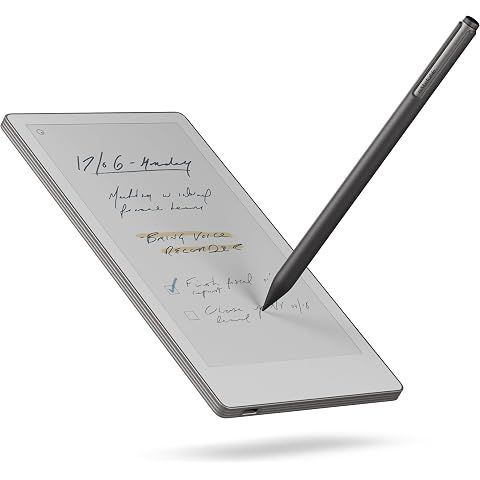
TLDR Review: reMarkable Paper Pro Move
Verdict
If you're after the ultimate digital pocket notebook offering a genuine pen-on-paper feel with ultraportable hardware and decent color support, the reMarkable Paper Pro Move is hard to beat in this niche. It shines for quick note-taking, brainstorming, and productivity on the go with impressive battery life and cloud syncing. However, if you need a larger screen for frequent PDF annotation or demand more versatile app support and faster screen responsiveness, you might want to consider waiting or looking elsewhere. This device is tailored specifically for focused handwriting lovers who appreciate minimalist design and are willing to invest in a premium but specialized tool.
- Top pro:
- The ultraportable 7.3-inch color E Ink display is perfect for on-the-go productivity, easily fitting into small bags, pockets, or even fanny packs.
- Top con:
- The smaller 7.3” screen size can feel cramped for reading or annotating PDFs and bulky documents, often requiring zooming and more navigation.
Pros
- •The ultraportable 7.3-inch color E Ink display is perfect for on-the-go productivity, easily fitting into small bags, pockets, or even fanny packs.
- •Writing on the Paper Pro Move feels remarkably natural and paper-like, with excellent responsiveness, pressure sensitivity, and support for various writing styles and strokes.
- •The included Marker Plus stylus with magnetic attachment and built-in eraser adds convenience and enhances the tactile experience.
- •Battery life impresses with up to two weeks of use on a single charge, plus quick charging that provides up to three days of use with just 10 minutes plugged in.
- •The minimalist, sleek silver aluminum design is lightweight (232g) and sturdy, blending professionalism with casual portability.
- •Strong cloud syncing capabilities integrate smoothly with Google Drive, Dropbox, and Microsoft OneDrive, while also supporting handwriting search and templates for efficient note-taking.
- •Features a soft front light for low-light use, along with a color palette that supports nine pen colors and six highlighters for effective color coding and more vibrant note organization.
- •The software includes handy gestures like two-finger tap to undo and screen rotation for landscape or portrait use, adapting well to different writing or sketching needs.
- •Environmentally conscious design uses 20% recycled materials, appealing to users who value sustainability.
- •The device’s focused, distraction-free interface makes it ideal for writers, students, and professionals who want a digital notebook that closely mimics pen-and-paper without typical tablet distractions.
Cons
- •The smaller 7.3” screen size can feel cramped for reading or annotating PDFs and bulky documents, often requiring zooming and more navigation.
- •There is a noticeable lag and slower refresh rate when loading documents, flipping pages, or refreshing handwriting, which can interrupt quick workflows.
- •Handwriting-to-text transcription and handwriting search features are still in beta and work inconsistently, sometimes requiring patience and editing.
- •The proprietary stylus only supports the bundled Marker Plus, and replacements can be expensive; the magnetic attachment is handy but the pen can be easy to misplace without a case.
- •No keyboard accessory options or broader app support exist, limiting the device primarily to handwriting and sketching rather than full tablet functionality.
- •Lacks biometric unlock features and has a minor annoyance with frequent passcode entry due to settings.
- •The price is high compared to general-purpose tablets, making it a luxury device focused on a niche writing experience rather than all-in-one productivity.
- •Color E Ink offers visual appeal but comes with slower screen refresh and visible ink transitions that some may find distracting.
- •Absence of user-replaceable battery limits long-term serviceability.
- •Some software features, like advanced templates and collaborative reviewing, require a subscription, which can add ongoing costs.
We may earn a commission when you buy through these links, at no extra cost to you. How ShopSavvy makes money
How we researched this
About this review: it summarizes the professional reviews and customer ratings ShopSavvy collected for this product, alongside prices from 1 retailer in ShopSavvy's price data, most recently seen Sep 4, 2025.
 Download ShopSavvy App
Compare prices across tens of thousands of stores, set price alerts, watch for deals by keyword, and much more.
 Install ShopSavvy Browser Extension
Compare and track prices automatically while you shop online at thousands of websites.




