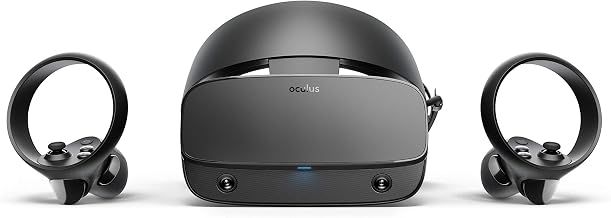
TLDR Review: Oculus Rift S
Verdict
The Oculus Rift S is a solid choice for those seeking a high-quality PC VR experience with rich visuals and a straightforward setup. Its improved tracking and comfortable design make it a significant upgrade over the original Rift and other Windows Mixed Reality headsets. However, software stability issues, controller tracking inconsistencies, and basic audio quality are notable flaws that can impact the overall experience. If you’re willing to deal with occasional bugs and want access to a broad library of VR titles, the Rift S offers a compelling package. Still, the Oculus Quest 2 or other standalone options might be worth considering if wireless convenience and better build quality are priorities.
- Top pro:
- Easy setup and installation, perfect for newcomers who want to jump into VR without hassle
- Top con:
- Lack of physical IPD adjustment can cause discomfort or blurry vision for some users, as software adjustments are ineffective
Pros
- •Easy setup and installation, perfect for newcomers who want to jump into VR without hassle
- •Inside-out tracking eliminates the need for external sensors, reducing setup clutter
- •Comfortable for extended wear, with good padding and a design that fits glasses easily
- •Sharp, vibrant display with high visual clarity that immerses you in VR worlds
- •Compatible with SteamVR and Oculus libraries, unlocking a huge range of titles
- •Good tracking performance that is significantly better than PSVR and original Rift
- •Lightweight and portable, ideal for quick setups anywhere with a compatible PC
- •Recognized instantly by most PCs with minimal fuss, especially with high-end GPUs (like GTX 1070 or better)
- •The Oculus platform offers a strong library of exclusive titles, making the investment worthwhile for Oculus fans
- •Improved optics with LCD panels providing clearer images and a forgiving eye positioning sweet spot
Cons
- •Lack of physical IPD adjustment can cause discomfort or blurry vision for some users, as software adjustments are ineffective
- •Video output via DisplayPort-only, so users with different ports may need adapters
- •Difficult to put on or remove if wearing glasses without lens protectors, which are recommended
- •Software can be buggy—disconnections, system crashes, visual glitches like static frames, and frequent reboots required
- •Controller tracking is unreliable and inconsistent, often causing missed actions or frustration during gameplay
- •Audio quality is poor, with no bass and low volume; better with third-party headphones but still lacking
- •Wired connection can be restrictive, with some experiencing lag or USB bandwidth issues affecting performance
- •Build quality feels somewhat cheap, with concerns about durability, especially in paddings and mechanisms
- •The headset sometimes displays a black screen or experiences glitches needing troubleshooting
- •Video quality is excellent but blacks are not as deep as OLED headsets, and peripheral vision blurs slightly
We may earn a commission when you buy through these links, at no extra cost to you. How ShopSavvy makes money
How we researched this
About this review: it summarizes the professional reviews and customer ratings ShopSavvy collected for this product, alongside prices from ShopSavvy's price data.
Discussion
Know something we should add, or spot a detail that has changed? Tell us below. We check it against the maker's information and update the article.
 Download ShopSavvy App

Compare prices across tens of thousands of stores, set price alerts, watch for deals by keyword, and much more.
 Install ShopSavvy Browser Extension

Compare and track prices automatically while you shop online at thousands of websites.