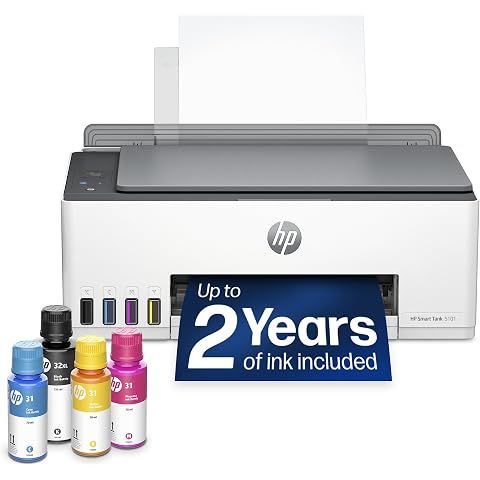
TLDR Review: HP Smart Tank 5101 Printer
Verdict
The HP Smart Tank 5101 is a solid choice if you want a cost-effective, high-quality all-in-one ink tank printer tailored for home use. Its biggest selling points are the included ink for two years, excellent print quality, and versatile wireless printing options, especially for Mac users. However, if you’re looking for faster printing, automatic duplexing, or a more robust paper handling system, this model might leave you wanting. The connectivity quirks and paper feeder issues are worth weighing before committing. For those prioritizing duplex printing or faster speeds, consider exploring other HP or Epson ink tank models that specifically highlight these features.
- Top pro:
- Comes with 2 years of Original HP Ink included, which is a great value and reduces the hassle of frequent ink purchases.
- Top con:
- Does not support automatic double-sided printing; duplexing must be done manually, which can be inconvenient.
Pros
- •Comes with 2 years of Original HP Ink included, which is a great value and reduces the hassle of frequent ink purchases.
- •Easy and straightforward setup process praised by multiple users, especially when opting for manual setup over the guided method.
- •High-quality print output, delivering vibrant colors and sharp text on various paper types including specialty media.
- •Wireless connectivity via WiFi Direct and Bluetooth offers flexible printing options, including from mobile devices without internet.
- •Runs efficiently on 2.4 GHz Wi-Fi networks and is particularly compatible with MacBook and macOS environments.
- •Ink tank system is economical, affordable, and easy to refill with minimal mess.
- •Bluetooth printing is a unique feature in this price range, allowing direct device-to-printer communication.
- •Visible ink levels and hassle-free ink refilling help users monitor usage and maintain performance.
- •"Draft" mode enables extremely fast printing speeds (~3 seconds per full text page), though with some trade-off in quality.
- •Compact and well-packaged with protective handles for easier handling and setup.
Cons
- •Does not support automatic double-sided printing; duplexing must be done manually, which can be inconvenient.
- •Paper feeder quality is poor, causing occasional paper jams and feeding issues that can be frustrating to clear.
- •Printing speed can be slow in normal or higher-quality modes, with some users noting delays especially outside of draft settings.
- •Wireless and Bluetooth connections can be unreliable or difficult to maintain, particularly with Android devices and weaker routers.
- •Requires 2.4 GHz Wi-Fi network only; no support for 5 GHz bands, which may limit connectivity options in some homes.
- •The printer has no automatic document feeder and does not support scanning multiple copies.
- •Small display screen limits ease of navigation and status information visibility.
- •Setup instructions can be confusing for some, despite overall ease once familiar.
- •Limited paper capacity makes it less ideal for users who need to print large batches without frequent reloads.
- •Bluetooth feature requires extra app downloads and can suffer from buggy behavior, reducing convenience.
We may earn a commission when you buy through these links, at no extra cost to you. How ShopSavvy makes money
How we researched this
About this review: it summarizes the professional reviews and customer ratings ShopSavvy collected for this product, alongside prices from ShopSavvy's price data.
 Download ShopSavvy App
Compare prices across tens of thousands of stores, set price alerts, watch for deals by keyword, and much more.
 Install ShopSavvy Browser Extension
Compare and track prices automatically while you shop online at thousands of websites.




