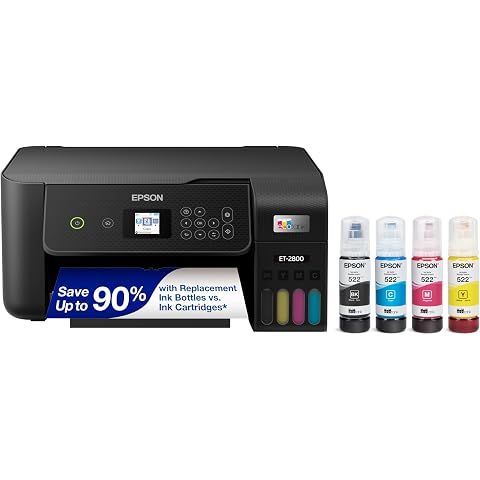
TLDR Review: Epson EcoTank ET-2800 Printer
Verdict
The Epson EcoTank ET-2800 is a smart choice for budget-conscious home users who want to avoid the recurring expense of ink cartridges and value wireless, all-in-one functionality in a compact package. It shines for everyday document printing, scanning, and copying but is not designed for professional photo work or high-volume office use. Be prepared for a somewhat lengthy setup and occasional connectivity quirks. If you’re seeking more advanced features like automatic duplex printing or faster performance, you might want to consider other models in Epson’s lineup or competitive alternatives.
- Top pro:
- Cartridge-free printing with high-capacity refillable ink tanks significantly reduces ongoing ink costs and ink-buying hassle.
- Top con:
- Initial setup can be frustrating and time-consuming, with some users reporting significant difficulties.
Pros
- •Cartridge-free printing with high-capacity refillable ink tanks significantly reduces ongoing ink costs and ink-buying hassle.
- •Wireless connectivity enables convenient printing from multiple devices anywhere in the home.
- •Supertank ink system delivers a high page yield, making it budget-friendly for regular home use.
- •Includes scan and copy functions, adding versatility beyond basic printing tasks.
- •Compact and lightweight design fits easily on most countertops and is portable.
- •Supports a wide range of paper types and sizes, including glossy photo and standard document paper.
- •Epson MicroPiezo print heads enable precise printing with up to 5760 x 1440 dpi resolution.
- •Works well for printing sharp text documents quickly, suitable for everyday home and school needs.
- •Easy to refill ink tanks, further lowering hassle and expense over cartridges.
- •Compatible with multiple operating systems, including Windows, macOS, and some Linux distros.
Cons
- •Initial setup can be frustrating and time-consuming, with some users reporting significant difficulties.
- •The small, 1.44-inch color LCD screen is often described as tiny and hard to read without straining.
- •Wireless connection can be unreliable at times, requiring frequent reconnection or troubleshooting.
- •Lack of advanced office features such as automatic double-sided printing or fax capability.
- •Print quality is decent for documents but may fall short for professional photo prints or vibrant images.
- •Frequent printhead cleaning is sometimes necessary to maintain print quality, especially if the printer is left idle.
- •Paper jams and print speed are reported issues by a minority of users.
- •Not suitable for heavy or business-grade printing due to slow print speeds and planned obsolescence after extensive use.
- •The printer only supports one paper source at a time, so manual swapping is needed when switching media types.
- •Noise levels are moderate; some users find the printer noisier than expected.
We may earn a commission when you buy through these links, at no extra cost to you. How ShopSavvy makes money
How we researched this
About this review: it summarizes the professional reviews and customer ratings ShopSavvy collected for this product, alongside prices from 1 retailer in ShopSavvy's price data, most recently seen Aug 18, 2026.
 Download ShopSavvy App
Compare prices across tens of thousands of stores, set price alerts, watch for deals by keyword, and much more.
 Install ShopSavvy Browser Extension
Compare and track prices automatically while you shop online at thousands of websites.




