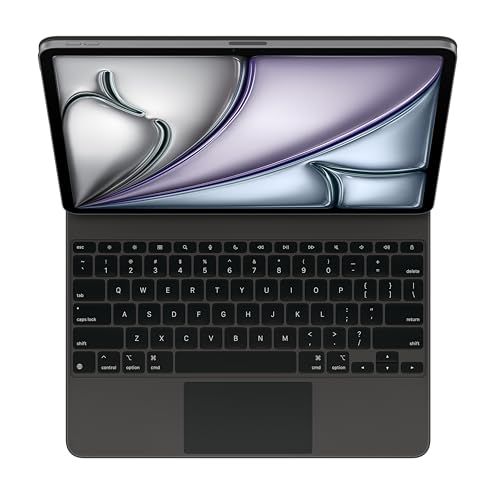
TLDR Review: Apple Magic Keyboard for iPad Air 13-inch (M3)
Verdict
If you want to dramatically boost productivity and enjoy the tactile typing experience of a MacBook on your iPad Air 13-inch, the Apple Magic Keyboard (M3) delivers premium build, seamless integration, and convenient features like charging through the case. Just be ready for some extra weight and a lack of keyboard backlighting—these trade-offs might not be for everyone. For those prioritizing lighter weight or backlit keys, you may want to explore alternative keyboard cases, but for pure Apple compatibility and that top-tier typing feel, this one’s hard to beat.
- Top pro:
- Transforms the iPad Air 13-inch into a mini MacBook experience with a responsive trackpad and touchscreen support.
- Top con:
- Adds noticeable weight and a somewhat top-heavy feel to the iPad Air, which can be tricky to use on the lap.
Pros
- •Transforms the iPad Air 13-inch into a mini MacBook experience with a responsive trackpad and touchscreen support.
- •Provides a high-quality, well-spaced Apple keyboard that closely mimics MacBook typing comfort.
- •Magnetic attachment and automatic pairing make setup effortless and secure.
- •Charging the iPad through the keyboard’s integrated USB-C port frees up the iPad’s own port for data.
- •Sleek, premium design with a floating style that adds protection without excessive bulk.
- •Lightweight compared to older keyboard cases, improving portability.
- •Stable enough to use on a desk and can stay balanced on the lap if handled carefully.
- •Non-backlit keys are surprisingly readable in dim light, despite the lack of backlighting.
- •Detachable keyboard option allows reducing weight when preferred.
Cons
- •Adds noticeable weight and a somewhat top-heavy feel to the iPad Air, which can be tricky to use on the lap.
- •Lacks backlit keys except for a Caps Lock light, potentially inconvenient in low-light environments.
- •Offers minimal rear protection compared to bulkier keyboard cases.
- •Mouse/trackpad navigation on iPadOS still requires some adjustment and isn’t as precise as a laptop touchpad.
- •Feels expensive for what’s offered, especially given missing features like full backlighting.
- •Can be intimidating for users who are reluctant to adopt a keyboard accessory for their iPad.
We may earn a commission when you buy through these links, at no extra cost to you. How ShopSavvy makes money
How we researched this
About this review: it summarizes the professional reviews and customer ratings ShopSavvy collected for this product, alongside prices from ShopSavvy's price data.
 Download ShopSavvy App
Compare prices across tens of thousands of stores, set price alerts, watch for deals by keyword, and much more.
 Install ShopSavvy Browser Extension
Compare and track prices automatically while you shop online at thousands of websites.




