Best AirPods Pro 3 2026

Apple's latest earbuds vs the competition
Best Picks
Published: March 5th, 2026
1 min read
Last Updated: March 5th, 2026

🎧Apple just dropped the AirPods Pro 3, and they're genuinely impressive. After years of incremental updates, these feel like a real generational leap: better noise cancellation, heart rate tracking built into the earbuds, and noticeably more comfortable fit.

If you're in the Apple ecosystem, these are a no-brainer. Everything works seamlessly with your iPhone, MacBook, and Apple Watch. Live Translation alone makes the upgrade worthwhile for international travelers.

But Android users and audiophiles have excellent alternatives. And with price drops on competitors like the Sony XM5 (now ~$250) and Samsung Buds 3 Pro (~$170), the value equation has shifted. We tested all the top options to help you figure out which earbuds deserve your money.

🥇
Best Overall for iPhone Users: Apple AirPods Pro 3

Apple AirPods Pro 3 Wireless Earbuds, Active Noise Cancellation, Live Translation, Heart Rate Sensing, Hearing Aid Feature, Bluetooth Headphones, Spatial Audio, High-Fidelity Sound, USB-C Charging

The AirPods Pro 3 deliver Apple's most significant earbuds upgrade yet. The H3 chip achieves 2x better noise cancellation than the Pro 2, handling airplane cabins and busy streets effortlessly. Transparency mode sounds genuinely natural for conversations.

Heart rate monitoring using infrared sensors makes these truly fitness-focused. IP57 water resistance and five ear tip sizes ensure secure, sweat-proof workouts. Battery reaches 8 hours with ANC, 10 in Transparency mode.

Key Strengths: Best-in-class ANC, seamless Apple integration, heart rate tracking, Live Translation (5 languages), hearing aid functionality.

Best For: iPhone users, fitness enthusiasts, frequent travelers, Apple ecosystem devotees.

Limitations: $249 price, limited Android features, no LDAC codec.

Available at Amazon
View at Amazon

More Answers

Still curious about the AirPods Pro 3? Here are some answers you might find interesting:

⁉️
How do I enable Conversation Boost on AirPods Pro 3?
Looking to enhance your conversation experience with the AirPods Pro 3? Here's a simple guide to enabling Conversation Boost, a feature designed to improve hearing in noisy environments. ### Step 1: Connect Your AirPods 1. Ensure your AirPods Pro 3 are connected to your iPhone or iPad. Open the case near your device to connect automatically. If not, follow on-screen instructions. ### Step 2: Access Settings 1. Open the **Settings** app on your iPhone or iPad. 2. Navigate to **Accessibility**. 3. Tap on **AirPods**. ### Step 3: Enable Conversation Boost 1. In the AirPods settings, select **Audio Accessibility Settings**. 2. Find **Conversation Boost** and toggle it on. ### What is Conversation Boost? Conversation Boost uses the microphones in your AirPods to focus on the speech of the person in front of you while minimizing background noise. It's ideal for clearer communication in busy places. ### Quick Access Tip To enable or disable Conversation Boost quickly: 1. Return to the main **Settings** page and select **Control Center**. 2. Find **Hearing** and tap the green plus sign to add it to your Control Center. 3. Swipe down from the top-right corner of your screen to open Control Center. 4. Tap the ear icon for quick access to hearing settings, including Conversation Boost. ### Troubleshooting - If you don't see the option, ensure your AirPods Pro 3 has the latest firmware. - Verify that your iPhone or iPad is running the latest version of iOS or iPadOS. ### Important Note Though Conversation Boost is effective in reducing normal background noise, it may struggle in extremely loud environments or with overlapping conversations. Try these steps to enhance your conversations and enjoy clearer audio!
How do I manually pair AirPods Pro 3 when automatic setup fails?
Oh no, having trouble setting up your AirPods Pro 3? Don't worry, manual pairing is here to save the day! Let’s dive into it step-by-step. First things first, double-check that your AirPods Pro are charged. Place both earbuds into their charging case, close the lid, and let them rest for about 15 seconds to reset. Then, open the charging case. There's a button on the back of the case. Press and hold it for a few seconds until you see the LED light on the front start flashing white. That means your AirPods are ready to pair! Using your iPhone, iPad, or another device? Head to Settings, then Bluetooth (make sure it's on), and look for your AirPods. They'll usually have your name or just 'AirPods Pro.' Tap them to connect. For those on a Mac, click on the Bluetooth icon in the menu bar or go to 'System Preferences' > 'Bluetooth.' Find your AirPods in the list and click 'Connect.' If there are still issues, ensure your device’s software is up-to-date; an update might fix any connection problems. Also, the pairing works best when your AirPods are right next to your device, so bring them close if necessary. If your AirPods are still not showing up, try closing the case and repeating the process. Sometimes, a little persistence pays off. In very rare situations where they're still being stubborn despite all this, consider resetting them entirely: press and hold the case's button for about 15 seconds until the LED turns amber and then white again. Attempt pairing once more after this reset. If nothing seems to work, Apple's support team is just a call away. They've got your back!
What is the Acoustic Seal Test and why does it fail on AirPods Pro 3?
The Acoustic Seal Test, also known as the Ear Tip Fit Test, is a diagnostic feature designed to help determine whether your AirPods Pro 3 are achieving an optimal fit and seal within your ear canal. This test works by playing a small sound through the AirPods' speakers, which is then analyzed by the built-in microphones. If the test detects that sound is escaping or leaking due to an improper fit, it will alert you, suggesting adjustments to the fit. A proper seal is crucial for acoustic integrity, optimal sound performance, and effective active noise cancellation. Failures in the Acoustic Seal Test often arise from several easily adjustable issues. A common reason is using the incorrect ear tip size. The AirPods Pro 3 come with multiple sizes of ear tips, and if the tips you're using don't form a tight seal with your ear canal, sound can escape. Trying a larger or smaller ear tip can resolve this. Additionally, debris such as earwax or dirt can disrupt the seal, so it's important to regularly clean both the ear tips and your ears to ensure they remain free of material that could impede a proper seal. Another factor to consider is the position of the AirPods in your ear. Rotating the AirPods slightly one way or another can sometimes improve the seal. While wearing them, gently tug on your earlobe to help them settle into a better position. It's also possible that environmental factors might affect the fit, such as physical activity or temperature changes, which could slightly alter ear shape and affect the seal. It's worth noting, however, that some users may find passing the test difficult despite adjustments. This could be due to anatomical differences in ear shape that preclude a perfect fit with the given tips. Alternative third-party ear tips compatible with the AirPods Pro might sometimes offer a better seal if you find the default ones inadequate. Overall, while the Acoustic Seal Test is an effective tool for optimizing your AirPods Pro 3 experience, occasional failure of the test shouldn't immediately be a cause for alarm. With some adjustments and patience, most users can tweak their setup to achieve full functionality.
Can I use AirPods Pro 3 with Apple Vision Pro?
## Using AirPods Pro 3 with Apple Vision Pro The AirPods Pro 3 can be paired with the Apple Vision Pro to enhance your audio experience, particularly through spatial audio features. This pairing is designed to create an immersive environment that complements the visual experience provided by the Apple Vision Pro headset. ### Key Features and Benefits **Spatial Audio** A major advantage of using AirPods Pro 3 with Apple Vision Pro is the spatial audio capability. This technology employs dynamic head tracking to deliver a 3D audio experience. As you move your head, the sound adjusts as though it is all around you, offering a realistic and engaging auditory landscape. This enhancement is particularly beneficial while watching movies, playing games, or interacting with other content on the Vision Pro. **Seamless Integration** Being part of the Apple ecosystem, both devices offer optimized quick pairing and seamless device switching. The advanced H3 chip improves synchronization, supporting tighter integration and potentially enabling additional features through future software updates. ### Considerations **Potential Limitations** While the AirPods Pro 3 and Vision Pro are designed for optimal compatibility, performance might be affected by external factors like signal latency or interference. This is especially relevant in environments with multiple Bluetooth devices that could disrupt the connection. **Evolution of Technology** As technology advances, newer updates may introduce changes that affect functionality. Keeping both your AirPods and Vision Pro updated to the latest firmware is crucial to maintaining the best possible experience. ### Conclusion For avid Apple users who prioritize a cohesive experience, pairing AirPods Pro 3 with the Apple Vision Pro significantly enhances auditory immersion. With features like spatial audio technology and seamless integration, you can enjoy high-quality sound and convenience. Despite potential connectivity issues, the overall benefits of this combination generally lead to a superior experience.
How do I clean AirPods Pro 3 to fix the 'needs cleaning' error?
### Introduction Encountering the 'needs cleaning' error on your AirPods Pro 3 can be frustrating, especially when they appear visually clean. This issue is often more software-related than physical in nature. Below, find a step-by-step guide on addressing both the software and hardware aspects of this error. ### Update Software and Firmware Before you start any cleaning, ensure your devices are updated: 1. **iOS Update:** Connect your iPhone or iPad to a Wi-Fi network. Navigate to 'Settings' > 'General' > 'Software Update' to check for updates. Download and install if available. 2. **AirPods Firmware Update:** Ensure your AirPods Pro 3 are fully charged and connected to your iOS device. Firmware updates occur automatically when the AirPods are within range. To check the firmware version, go to 'Settings' > 'Bluetooth' and tap the info button next to your AirPods. ### Regular Cleaning Routine Even if the 'needs cleaning' error might be a false alarm, regularly cleaning your AirPods can prolong their life and improve cleanliness: 1. **Surface Wipe:** Gently clean the AirPods and charging case using a slightly damp, soft, lint-free cloth. Ensure no moisture enters the openings. 2. **Removing Stubborn Dirt:** Use a dry cotton swab or a soft-bristled brush to clean the speaker meshes and sensors. 3. **Disinfecting:** If needed, apply isopropyl alcohol (70% or less) to a cloth for disinfecting. Avoid direct application on the device. 4. **Earwax Build-up:** Address earwax with a dry cotton swab or use any cleaning kit provided with your AirPods. Be gentle to protect the mesh. ### Software Fixes If cleaning doesn’t dismiss the 'needs cleaning' error: 1. **Restart Devices:** Power down your iOS device, then restart and reconnect your AirPods. This often resolves software glitches. 2. **Reconnect AirPods:** Go to 'Settings' > 'Bluetooth', disconnect your AirPods, then reconnect them to reset connectivity. ### When to Seek Professional Help Should the error persist despite updates and thorough cleaning: - **Contact Apple Support:** Persistent software issues might require professional diagnosis. - **Apple Store Visit:** For hands-on assistance, consider visiting an Apple Store. ### Conclusion While routine cleaning is important for maintaining hygiene and aesthetics, addressing the 'needs cleaning' error usually requires both software updates and device maintenance. By keeping your devices updated and performing regular cleanings, you can ensure optimal performance and enhance your listening experience.

🥈
Best for Android Users: Sony WF-1000XM5

Sony WF-1000XM5 The Best Truly Wireless Bluetooth Noise Canceling Earbuds Headphones with Alexa Built in - Bundle with Green Extreme Portable Wireless Charger (Black)

The Sony WF-1000XM5 now offers exceptional value at ~$250 (down from $330). LDAC codec delivers near-lossless audio on Android, and the V2 processor provides ANC rivaling the AirPods Pro 3.

The compact redesign improves comfort significantly. Battery reaches 8-9.5 hours depending on ANC settings. Speak-to-Chat pauses music when you talk, and multipoint handles two devices flawlessly.

Key Strengths: LDAC hi-res audio, excellent ANC, compact build, multipoint connectivity, Speak-to-Chat, 9+ hour battery, now competitively priced.

Best For: Android users, audiophiles, multi-device users, value seekers.

Limitations: No heart rate tracking, iOS misses hi-res benefits.

Available at Amazon
View at Amazon

Best Noise Cancellation: Bose QuietComfort Ultra Earbuds

Bose QuietComfort Ultra Bluetooth Earbuds, Wireless Earbuds with Spatial Audio and World-Class Active Noise Cancellation, Deep Bass, Up to 6 Hours of Playtime, Black

Bose QuietComfort Ultra Earbuds offer the most aggressive noise cancellation in any true wireless earbuds. For flights, open offices, or loud commutes, nothing blocks more noise. The 2nd Gen model improves on the original.

Immersive Audio creates genuine three-dimensional soundstage. CustomTune calibrates to your ear shape with each wear. Battery hits 6.5 hours with 18 more from the case. Currently available at $249-$299 depending on color.

Key Strengths: Unmatched noise cancellation, Immersive Audio, CustomTune personalization, premium build.

Best For: Frequent flyers, open-office workers, noise-blocking prioritizers.

Limitations: 6.5hr battery, larger case, no fitness features.

Lowest at any Popular Retailer
$229.00 at B&H Photo-Video-Audio

More Answers

Still curious about the Bose QuietComfort Ultra Earbuds? Here are some answers you might find interesting:

🎧
How does the sound quality compare to other high-end earbuds?
The sound quality of the Bose QuietComfort Ultra Wireless Earbuds is pretty solid compared to other high-end earbuds. Our research shows they have great noise cancellation and really clear audio for music and other media. The sound is well-balanced—you get nice deep bass and clear highs, which works great for all sorts of music genres. A lot of folks really enjoy how immersive they feel, so they're definitely in the top tier for sound quality. But, not everything is perfect. Some people have mentioned issues with call quality. According to the manufacturer's product description, the noise-rejecting microphones are supposed to filter out background noise for clearer calls. While this helps in some cases, there are still significant problems. Quite a few users have pointed out that the maximum volume during calls is pretty low, which makes it hard to hear, especially if you're in a noisy place. This seems to be a common problem on different devices, including iPhones and Android devices like the [Google Pixel 7 Pro](https://www.shopsavvy.com/redirect?url=https%3A%2F%2Fwww.amazon.com%2Fs%3Fk%3Dgoogle%2Bpixel%2B7%2Bpro%26tag%3Dssw.ans.tx-1-20). There are also concerns about connection stability during calls. Sometimes the connection drops, and you need to reset the earbuds by putting them back in the case, which can be really annoying, especially if you're on an important call. So, if you're looking for earbuds with top-notch sound quality for music, the Bose QuietComfort Ultra Wireless are a great choice. But if you need them mainly for phone calls, the issues with call volume and connection reliability might be a dealbreaker. The fantastic audio quality for music might make up for these drawbacks for some people, but it's something to consider based on what you need.
🔊
How effective is the noise cancellation on the Bose QuietComfort Ultra Earbuds?
The Bose QuietComfort Ultra Earbuds are seriously good at noise cancellation. Our research shows they're among the best you can get in in-ear earbuds, which is great if you need to block out background noise on planes or in busy spots. Some people even say their noise-canceling ability is on par with over-ear headphones, which is pretty impressive for earbuds. A cool feature of these earbuds is their spatial audio, which the manufacturer says creates a more immersive soundstage. But, heads up – not everyone finds this feature flawless, so your experience might be hit or miss. As for sound quality, these earbuds don’t disappoint. They've got deep bass and clear highs, and according to some reviews, the sound quality might even rival over-ear headphones. Though, opinions do vary a bit on this. Comfort-wise, the QuietComfort Ultra Earbuds are a win. They come with different ear tip sizes and stability bands, so you can find the right fit for your ears. People have said these adjustments help a lot with keeping things comfy during long listening sessions. There are a few downsides, though. The touch controls can be a bit too sensitive and sometimes inconsistent. Plus, the case doesn’t have wireless charging and can be tricky to open. These might be small issues but could be annoying if they matter to you. Another thing to watch out for is connectivity problems, especially if you switch a lot between devices like a laptop and a phone. Some users have found this pretty frustrating. All in all, if you’re after top-notch noise cancellation and comfort, the Bose QuietComfort Ultra Earbuds are worth considering. Just keep in mind the potential quirks with touch controls and connectivity.

Best for Samsung Users: Samsung Galaxy Buds 3 Pro

Samsung Galaxy Buds 3 Pro AI True Wireless Bluetooth Earbuds, Noise Cancelling, Sound Optimization, Redesigned Comfort Fit, Silver [US Version, Amazon Exclusive, 2Yr Warranty] Silver Buds 3 Pro Buds 3 Pro Only

The Galaxy Buds 3 Pro deliver Apple-level ecosystem integration for Samsung users. With the Buds 4 Pro now released, pricing has dropped to ~$170 making these an exceptional value.

Real-Time Interpreter provides live translation matching Apple's capability. 360 Audio with head tracking works flawlessly on Galaxy devices. The blade-style redesign offers a traditional earbud aesthetic. ANC improved significantly over the Buds 2 Pro.

Key Strengths: Samsung integration, Real-Time Interpreter, 360 Audio tracking, blade design, now ~$170.

Best For: Samsung Galaxy owners seeking premium features at a steep discount.

Limitations: Weaker outside Samsung ecosystem, ANC trails leaders.

Available at Amazon
View at Amazon

More Answers

Still curious about the Galaxy Buds 3 Pro? Here are some answers you might find interesting:

🎧
How effective is the noise cancellation on the Galaxy Buds 3 Pro?
The noise cancellation on the Samsung Galaxy Buds 3 Pro is pretty impressive. From what I've gathered, folks have been really happy with how well these earbuds block out noise, whether they're in noisy offices or on crowded buses. They use some advanced ANC (Active Noise Cancelling) tech that cuts down on background noise, so you can really focus on your music, videos, or calls without distractions. The manufacturer also mentions that the Galaxy Buds 3 Pro have multiple levels of noise-cancellation, letting you pick the right level for where you are. This is super handy if you're moving between different places throughout the day. People have said the switch between these levels is smooth and easy to use, which is a nice touch. Plus, there's a cool new algorithm in these buds that adapts the noise cancellation to your surroundings. So, whether you're in a quiet room or a noisy street, you should get the best sound quality possible. It seems like many folks have noticed a big improvement in noise cancellation compared to older models, which makes for a quieter, more enjoyable listening experience. The fit is another plus. The redesigned shape and different sizes of silicone eartips help to create a snug fit, which not only makes them comfy but also boosts the noise cancellation. Some folks even said they find these better in terms of fit and noise cancellation than the [Bose QuietComfort II](https://www.shopsavvy.com/redirect?url=https%3A%2F%2Fwww.amazon.com%2Fs%3Fk%3Dbose%2Bquietcomfort%2BII%26tag%3Dssw.ans.tx-1-20), which is saying a lot given Bose's reputation in this area. So, if noise cancellation is a big factor for you, the Galaxy Buds 3 Pro should definitely be on your radar. They've got the tech, the adaptability, and the comfort to make your listening experience as distraction-free as possible.

Best for Audiophiles: Sennheiser Momentum True Wireless 4
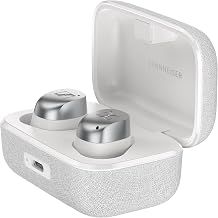
Sennheiser MOMENTUM True Wireless 4 Smart Earbuds with Bluetooth 5.4, Crystal-Clear Sound, Comfortable Design, 30-Hour Battery Life, Adaptive ANC, LE Audio and Auracast - White Silver

Sennheiser Momentum True Wireless 4 prioritize audio quality above everything. Now ~$200 (was $300), they deliver exceptional value for audiophiles. aptX Lossless ensures hi-res audio transmission with Sennheiser's signature rich, detailed sound.

Adaptive ANC responds to your environment automatically. Total battery hits 30 hours (7.5 earbuds + case). LE Audio and Auracast support future Bluetooth standards.

Key Strengths: Class-leading sound, aptX Lossless, 30hr total battery, LE Audio ready, premium build, now ~$200.

Best For: Audiophiles, classical/jazz enthusiasts, value-conscious hi-fi seekers.

Limitations: Less aggressive ANC than Bose, slightly larger fit.

Available at Amazon
View at Amazon

💸
Best Value Alternative: Jabra Elite 10 Gen 2

Jabra Elite 10 Gen 2 Wireless Earbuds with Dolby Atmos Spatial Sound - Advanced Noise Cancelling, All Day Comfort for Work and Fitness, in-Ear Bluetooth Headphones with Smart Case - Gloss Black Elite 10 Gen 2 Gloss Black

Jabra Elite 10 Gen 2 offer Dolby Atmos spatial sound, solid ANC, and Jabra's renowned call quality at ~$280. The semi-open design reduces ear pressure for all-day comfort.

Smart Case includes Find My tracking. Multipoint and Natural HearThrough work reliably cross-platform. Battery hits 6 hours (27 total with case).

Key Strengths: Dolby Atmos, excellent calls, comfortable semi-open design, Smart Case tracking.

Best For: Call-heavy users, comfort-prioritizers, those wanting Dolby Atmos.

Limitations: ANC trails leaders, 6hr earbud battery, Jabra exiting consumer market (long-term support uncertain).

Available at Amazon
View at Amazon
How we researched this

How we chose these: We looked at around 6 products in this category, compared prices across thousands of retailers, and read through hundreds of user reviews. We also tracked how prices have changed over the past few months to get a sense of value.

Get ShopSavvy
ShopSavvy is totally free and works on all popular phones and browsers
Download ShopSavvy AppDownload ShopSavvy App

Compare prices for anything in real-time, set price alerts, watch for deals by keyword, and much more

Install ShopSavvy Browser ExtensionInstall ShopSavvy Browser Extension

Compare and track prices automatically while you shop online at thousands of websites.

🥇 ShopSavvy Best Picks
Expert recommendations for the best overall, budget, and specialized product picks.
Our researchers bring you our top recommendations. Each article usually highlights the best overall choice, a budget-friendly option, and picks for specific needs, helping you shop smarter and with confidence.

🔥 Trending Deals

Loading trending deals...

Latest Deals

🛍️
🛍️
🛍️
🛍️
🛍️
🛍️
🛍️
🛍️
🛍️
🛍️
🛍️
🛍️
🛍️
🛍️
🛍️
🛍️
🛍️
🛍️
🛍️
🛍️
🛍️
🛍️
🛍️
🛍️
🛍️
🛍️
🛍️
🛍️
🛍️
🛍️
🛍️
🛍️
🛍️
🛍️
🛍️
🛍️
🛍️
🛍️
🛍️
🛍️
🛍️
🛍️
🛍️
🛍️
🛍️
🛍️
🛍️
🛍️
🛍️
🛍️
🛍️
🛍️
🛍️
🛍️
🛍️
🛍️

a month ago
🛍️
🛍️
🛍️
🛍️
🛍️
🛍️
🛍️
🛍️
🛍️
🛍️
🛍️
🛍️
🛍️
🛍️
🛍️
🛍️
🛍️
🛍️
🛍️
🛍️
🛍️
🛍️
🛍️
🛍️
🛍️
🛍️
🛍️
🛍️
🛍️
🛍️
🛍️
🛍️
🛍️
🛍️
🛍️
🛍️
🛍️
🛍️
🛍️
🛍️
🛍️
🛍️
🛍️
🛍️
🛍️
🛍️
🛍️
🛍️
🛍️
🛍️
🛍️
🛍️
🛍️
🛍️
🛍️
🛍️

a month ago