Setting up the ARIFAYZ Dash Cam WiFi FHD 1080P is pretty simple and shouldn't give you much trouble.
Just make sure you have a microSD card on hand because it doesn't come with one. The manufacturer suggests using a PNY memory card for better performance, and you can go up to 128GB, which is plenty for its recording needs.
First, mount the dash cam on your windshield with either the adhesive mount or suction cup that comes in the box. Pick a spot that doesn't block your view while driving.
Then, plug the power cable into your car's cigarette lighter socket and tuck the cable around the edges of your windshield to keep everything neat.
Once you've got it powered up, the dash cam will turn on by itself and ask you to format the microSD card. According to our research, this part is pretty quick and easy. The interface is user-friendly, so setting things like the date, time, and resolution should be straightforward.
If you want to use the WiFi features, just download the recommended app on your phone. This makes it easy to view live footage or manage recordings. Our data shows that people generally find the app pretty dependable and easy to navigate.
So overall, the ARIFAYZ Dash Cam should be pretty hassle-free to install. With the clear instructions and straightforward steps, you should be able to get it up and running without much fuss.
We may earn a commission when you buy through these links, at no extra cost to you. How ShopSavvy makes money
How we researched this
Where this comes from: this answer draws on the product's published specifications and the reviews ShopSavvy collected for it, alongside prices from ShopSavvy's price data.
Discussion
Know something we should add, or spot a detail that has changed? Tell us below. We check it against the maker's information and update the article.
Considering the "Dash Cam WiFi FHD 1080P Car Camera"?
Here's our "TLDR" Review
 Download ShopSavvy App

Compare prices across tens of thousands of stores, set price alerts, watch for deals by keyword, and much more.
 Install ShopSavvy Browser Extension

Compare and track prices automatically while you shop online at thousands of websites.
More Answers
If you're still curious about the "Dash Cam WiFi FHD 1080P Car Camera", here are some other answers you might find interesting:
- 🚗 What SD card is recommended for the ARIFAYZ Dash Cam WiFi FHD 1080P?
For the ARIFAYZ Dash Cam WiFi FHD 1080P, you'll want a solid microSD card to keep everything running smoothly. The manufacturer says this dash cam does...
- 🎥 How long are the video clips recorded by the ARIFAYZ Dash Cam WiFi FHD 1080P?
The ARIFAYZ Dash Cam WiFi FHD 1080P generally records video clips in chunks of 1 to 3 minutes. This makes it a lot easier to find and review specific parts of...
- 📹 Does the ARIFAYZ Dash Cam WiFi FHD 1080P work with CarPlay?
No, the ARIFAYZ Dash Cam WiFi FHD 1080P doesn't work with CarPlay. CarPlay is mainly for using iPhone apps on your car's display, and dash cams like this one...
- 🌙 How good is the night vision on the ARIFAYZ Dash Cam WiFi FHD 1080P?
The night vision on the ARIFAYZ Dash Cam WiFi FHD 1080P seems to be quite solid. According to our research, it handles low-light conditions pretty impressively...
Alternatives to Consider
If the "Dash Cam WiFi FHD 1080P Car Camera" doesn't quite fit your needs, here are some other options to consider:

Nextbase 522GW Dash Cam
The Nextbase 522GW features a weatherproof casing and superb night vision, ideal for extreme weather. People love its ability to capture clear footage in heavy rain or snow, ensuring reliable performance in challenging conditions.
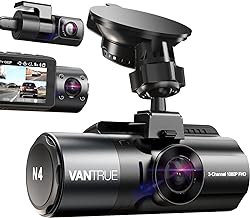
Vantrue N4 3 Channel Dash Cam
The Vantrue N4 offers 3-channel recording, capturing front, rear, and cabin views, along with advanced driver-assistance systems. This dash cam provides a comprehensive overview, enhancing safety, which is something the Dash Cam WiFi FHD 1080P lacks. Ideal for those who prioritize security.

Garmin Dash Cam 66W
The Garmin Dash Cam 66W stands out for its seamless app connectivity, letting folks easily manage video footage and access settings without hassle. Addressing common issues like connectivity problems with the Dash Cam WiFi FHD, this dash cam offers a more reliable and user-friendly experience.