Nope, the Lenovo IdeaPad 3i Chromebook doesn't have a touchscreen. The manufacturer's product description mentions it has a 15.6-inch Full HD (1920 x 1080) display, but it doesn't say anything about touch capabilities.
Our research backs this up too; quite a few folks have pointed out that it doesn't support touch, which has confused some buyers.
So, if you really need a touchscreen, this isn't the one for you.
We may earn a commission when you buy through these links, at no extra cost to you. How ShopSavvy makes money
How we researched this
Where this comes from: this answer draws on the product's published specifications and the reviews ShopSavvy collected for it, alongside prices from 1 retailer in ShopSavvy's price data, most recently seen Aug 20, 2026.
Considering the Lenovo IdeaPad 3i Chromebook?
Here's our "TLDR" Review
 Download ShopSavvy App
Compare prices across tens of thousands of stores, set price alerts, watch for deals by keyword, and much more.
 Install ShopSavvy Browser Extension
Compare and track prices automatically while you shop online at thousands of websites.
More Answers
If you're still curious about the Lenovo IdeaPad 3i Chromebook, here are some other answers you might find interesting:
- 🔌 What are the connectivity options on the Lenovo IdeaPad 3i Chromebook?
The Lenovo IdeaPad 3i Chromebook has got a bunch of connectivity options that'll cover your everyday needs. Based on what the manufacturer says, here's what's...
- ⌨️ How is the keyboard on the Lenovo IdeaPad 3i Chromebook?
The keyboard on the Lenovo IdeaPad 3i Chromebook is pretty good for what you pay. Our research indicates the keys are well-spaced and give a comfortable,...
- 💻 How is the display quality on the Lenovo IdeaPad 3i Chromebook?
The Lenovo IdeaPad 3i Chromebook has a 15.6-inch Full HD display (1920x1080), which should be pretty decent for everyday stuff like browsing and watching...
- 🔋 What is the battery life of the Lenovo IdeaPad 3i Chromebook?
The Lenovo IdeaPad 3i Chromebook offers a pretty solid battery life. The manufacturer says it can go up to 10 hours on a single charge. From what we've found,...
Alternatives to Consider
If the Lenovo IdeaPad 3i Chromebook doesn't quite fit your needs, here are some other options to consider:

Acer Aspire 5
With an AMD Ryzen processor and ample storage options, the Acer Aspire 5 can handle more resource-intensive applications like light gaming or video editing. This makes it a better alternative for folks who plan to multitask or run demanding software.

HP Pavilion x360
The HP Pavilion x360 boasts a 2-in-1 design, giving you the flexibility to use it as both a laptop and a tablet. Its versatility paired with Windows OS makes it a great option for creative professionals who need varied usage modes.
ASUS VivoBook 15
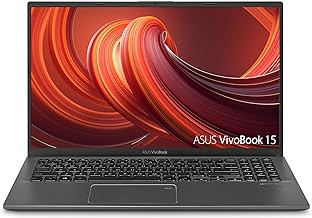
The ASUS VivoBook 15 offers larger SSD options that provide faster performance and ample space for file storage compared to the Lenovo IdeaPad 3i Chromebook. This is especially beneficial for those who require more storage for documents, media, and applications.

Dell Inspiron 15 3000
The Dell Inspiron 15 3000 features a higher-quality webcam that performs better in low-light conditions. This makes it a great alternative for professionals and students who frequently engage in video conferencing.