Yep, you can totally customize the RGB lighting on the Keychron K3 Max. This keyboard has a bunch of different RGB backlight modes you can play around with, right out of the box. According to the manufacturer, you don't need any extra software to change things up—everything's accessible directly on the keyboard, which is pretty convenient.
Our research shows that folks really like how easy it is to switch between lighting effects. You can just press a few keys to cycle through different patterns and colors. There are dynamic modes (like animated effects) and static modes (like solid colors), so whether you're working, gaming, or just want to show off your setup, there's something for you.
You can also choose from static colors or cool patterns like waves, ripples, and reactive fades. Plus, you can adjust the brightness to your liking. It's nice having control over the lighting, whether you're in a bright room or working late at night.
So, if you’re into RGB lighting, the Keychron K3 Max gives you plenty of options to tweak it just the way you like.
We may earn a commission when you buy through these links, at no extra cost to you. How ShopSavvy makes money
How we researched this
Where this comes from: this answer draws on the product's published specifications and the reviews ShopSavvy collected for it, alongside prices from ShopSavvy's price data.
Discussion
Know something we should add, or spot a detail that has changed? Tell us below. We check it against the maker's information and update the article.
Considering the Keychron K3 Max Keyboard?
Here's our "TLDR" Review
 Download ShopSavvy App

Compare prices across tens of thousands of stores, set price alerts, watch for deals by keyword, and much more.
 Install ShopSavvy Browser Extension

Compare and track prices automatically while you shop online at thousands of websites.
More Answers
If you're still curious about the Keychron K3 Max Keyboard, here are some other answers you might find interesting:
- 💻 How portable is the Keychron K3 Max keyboard?
The Keychron K3 Max is pretty portable, which is handy if you're often on the move. The manufacturer describes it as slim and lightweight, and it weighs about...
- 🎮 Is the Keychron K3 Max good for gaming?
The Keychron K3 Max is pretty versatile, whether you're gaming or switching between different devices for work. It's got Bluetooth 5.1 support for up to three...
- ⌨️ How does the Keychron K3 Max connect to devices?
The Keychron K3 Max connects to your devices either through Bluetooth or a wired USB-C connection, so you can choose whatever works best for you. It works...
- 🔋 What is the battery life of the Keychron K3 Max?
The Keychron K3 Max has pretty solid battery life. According to the manufacturer, it can go up to 72 hours with the backlight on and an amazing 9 weeks with...
Alternatives to Consider
If the Keychron K3 Max Keyboard doesn't quite fit your needs, here are some other options to consider:

Lofree Flow84
The Lofree Flow84 is better suited for gaming due to its lower input latency and responsive tactile switches. Its premium aluminum construction ensures durability during intense gaming sessions, while also providing a satisfying typing experience.

NuPhy Air75
If battery life is a key concern, consider the NuPhy Air75, which offers impressive performance and a longer-lasting battery than the K3 Max when backlighting is off. Its design combines modern aesthetics with functionality, making it an excellent alternative.

Epomaker TH80 Pro
The EPOMAKER TH80 Pro offers a competitive feature set at a more budget-friendly price than the K3 Max. It provides Bluetooth connectivity, hot-swappable switches, and customizable key layouts, allowing folks to enjoy a similar experience without breaking the bank.
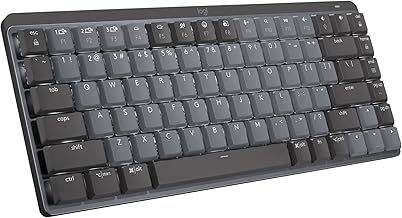
Logitech MX Mechanical Mini
The Logitech MX Mechanical Mini caters to the demand for a quieter workspace, making it a solid option for office environments. It also boasts an impressive battery life of up to 10 months with backlighting off, ensuring a hassle-free experience.

Keychron V1 Max
For those seeking switch customization, the Keychron V1 Max allows easy hot-swapping of switches, enabling folks to tailor the keyboard to their typing preference while maintaining similar functionality as the K3 Max.