Best Laptops for Android Development
💻If you’re serious about Android development, you know it’s pretty demanding on your laptop. Running emulators, compiling code, and designing interfaces all at once need a machine that won’t slow you down or leave you hunting for a charger mid-afternoon. We took a deep dive into recent tech reviews and what actual users are saying to pick laptops that hit the sweet spot between power, screen quality, and reliability.
Whether you’re juggling complicated projects or just starting out, there’s something on this list to help keep your workflow smooth and your code flowing.
🥇Overall Best: Dell XPS 15 9530 Laptop
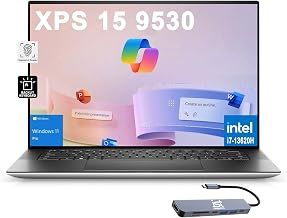
The Dell XPS 15 (2026) stands out as our top choice for Android developers, blending high-end performance with a stunning 15.6-inch 4K OLED display that’s ideal for detailed UI/UX work. Powered by Intel’s 13th-generation processors and able to support up to 64GB of RAM, it smoothly handles multitasking, heavy IDE workloads, and Android emulators without breaking a sweat. The vibrant OLED panel not only improves design accuracy but also reduces eye strain during long coding sessions. Despite its premium price tag, the solid build quality and reliable battery life make it a future-proof investment. Whether you’re juggling multiple projects or diving deep into app optimization, the XPS 15 offers the performance and versatility needed to stay productive on the go.
🥈Runner-up: Apple MacBook Pro 14-inch (M3 Pro)
💻The 14-inch MacBook Pro with the M3 Pro chip is a strong runner-up, especially appealing to developers who prefer macOS but regularly work with Android Studio. Its powerful M3 Pro processor delivers excellent multi-core performance and energy efficiency, contributing to impressive battery life that can last through extended development sessions. The Retina display offers sharp, color-accurate visuals which benefit UI design and debugging. While macOS isn’t the native environment for Android development, virtualization and container solutions run smoothly here, adding flexibility. However, developers should consider the higher cost and occasional software compatibility hiccups before committing. For those invested in the Apple ecosystem, the MacBook Pro provides a polished and capable development platform.
💸Budget Pick: Acer Swift 3
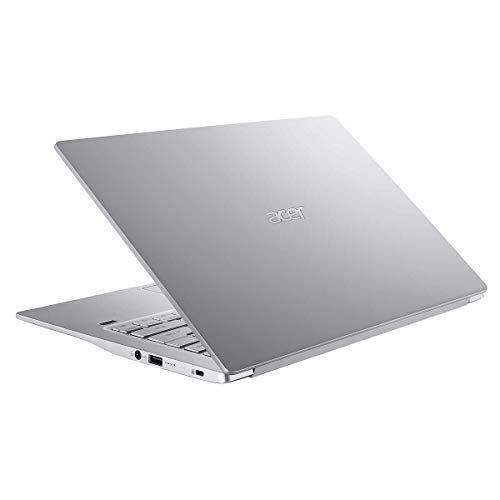
If you’re looking for a budget-conscious laptop without compromising too much on performance, the Acer Swift 3 is a practical pick. It features AMD Ryzen 7 processors paired with up to 16GB of RAM, providing sufficient muscle to handle Android Studio and emulators for everyday development tasks. The laptop’s lightweight design and solid battery life make it especially suitable for students or developers frequently on the move. While its display resolution and construction quality aren’t as premium as higher-end models, it delivers reliable performance for coding, testing, and multitasking at a fraction of the cost. The Acer Swift 3 strikes a sensible balance, proving that capable Android development machines don’t always require a hefty investment.
Specific Pick: Razer Blade 16 (2026) - Best for Gaming and Development
💻The Razer Blade 16 (2026) is a great match for developers who want a powerhouse laptop for both gaming and complex development. It features robust Intel Core i9 processors and Nvidia RTX 40-series graphics, ensuring smooth and speedy performance when running demanding Android emulators or graphic-intensive applications. Its high-refresh-rate 16-inch display provides fluid visuals, beneficial not only in gaming but also in UI testing where responsiveness matters. The premium build and durability stand out, making it suitable for developers who travel frequently or want a stylish yet rugged workstation. While it leans toward the expensive side, the Razer Blade 16’s combination of workstation-grade specs with gaming capabilities offers a distinctive all-in-one solution.
Specific Pick: Lenovo ThinkPad X1 Carbon Gen 12
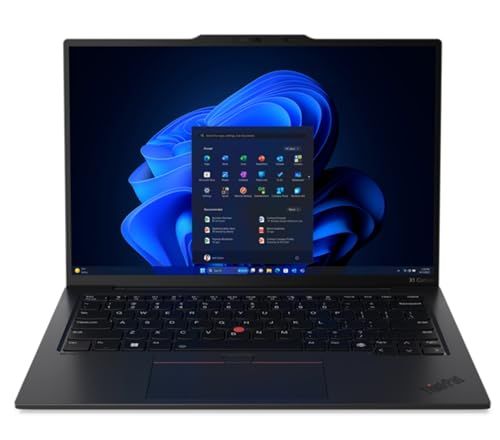
For those prioritizing portability and a classic business laptop feel, the Lenovo ThinkPad X1 Carbon Gen 12 is a reliable choice. Known for its exceptional keyboard, the ThinkPad delivers a comfortable coding experience, which is crucial during long development cycles. It’s powered by the latest Intel processors with up to 32GB of RAM, facilitating efficient multitasking across IDEs and Android emulators with minimal lag. Its slim, lightweight design and durable chassis are perfect for developers who are always on the move. While the integrated graphics might limit performance for graphically intensive tasks, it’s a solid laptop for general Android development, offering strong security features that add peace of mind in professional environments.
How we researched this
How we chose these: We looked at around 5 products in this category, compared prices across thousands of retailers, and read through hundreds of user reviews. We also tracked how prices have changed over the past few months to get a sense of value.
 Download ShopSavvy App
Compare prices across thousands of stores in real-time, set price alerts, watch for deals by keyword, and much more.
 Install ShopSavvy Browser Extension
Compare and track prices automatically while you shop online at thousands of websites.
🔥 Trending Deals




Footer 1
Get ShopSavvy
ShopSavvy
- Price Comparison
- Compare Prices
- App
- Browser Extension
- Desktop App
- Browser
- QR Code Reader
- ShopSavvy for Business
- AI Agents
- Data API
- Integrations
- Data API Dashboard
- Universal Product Search API
- Bulk Data Licensing
- For Retailers
- Share Your Product Feed
- Data Partners
- Help
- Advertise with Us
- About
- Compare
- Blog
- Press Kit
- Press Inquiries
- Business Inquiries
Subscribe for Updates
Get the latest news, and updates on ShopSavvy. You'll be glad you did!