Best Apple Laptops 2026
Apple's 2026 MacBook lineup ranges from the accessible $599 MacBook Neo to workstation-class Pro models exceeding $6,000. The right choice depends on your specific needs, budget, and how you'll use your laptop daily.
We've comprehensively tested every current MacBook to help you navigate this range. Our recommendations consider real-world performance, value proposition, and the specific use cases where each model excels.
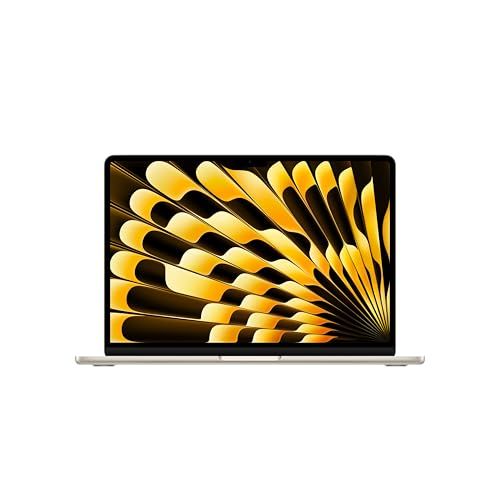
🥇Best Overall: Apple MacBook Air M5 13-inch (2026)
Why We Chose It:
For most people buying a MacBook in 2026, the Air M5 is the answer. It packs desktop-class performance into a silent, fanless design that lasts all day on a single charge. The M5 chip handles everything from intensive coding sessions to 4K video editing without breaking a sweat.
What Makes It Great:
Apple's M5 delivers a 25% performance leap over M4 while somehow improving already-excellent battery life to 18 hours. The 16GB unified memory handles professional workflows without slowdown, Wi-Fi 7 enables gigabit wireless speeds, and the stunning Liquid Retina display with P3 color makes content creation a joy. Dual external display support finally arrives on the Air.
Best For:
Software developers, content creators, students, and professionals who want a no-compromise laptop. The Air handles demanding tasks like compiling code, editing video in Final Cut Pro, or running multiple design apps simultaneously.
Limitations:
At $1,099, it's a meaningful jump from the Neo. Creative professionals working with 8K footage or complex 3D scenes may need the sustained performance of a MacBook Pro.
Bottom Line:
The MacBook Air M5 earns our top spot because it's the right choice for 90% of Mac buyers. Exceptional performance, all-day battery, gorgeous display, and silent operation at a competitive price.
We may earn a commission when you buy through these links, at no extra cost to you. How ShopSavvy makes money
💸Budget Pick: MacBook Neo 2026

Why We Chose It:
Apple's most affordable Mac ever at $599 ($499 for students) changes the equation for budget laptop buyers. The MacBook Neo competes directly with Chromebooks on price while delivering the full macOS experience, Apple Silicon performance, and build quality that feels anything but cheap.
What Makes It Great:
The A18 Pro chip from iPhone 16 Pro powers through everyday tasks with surprising capability. Benchmarks show single-core performance beating M1 and M2 MacBooks. The 13-inch Liquid Retina display is sharp and bright at 500 nits, the aluminum build feels premium, and 16 hours of battery life from passive cooling means all-day use in complete silence. Four color options add personality missing from other Macs.
Best For:
Students, first-time Mac buyers, and anyone who primarily uses web apps, documents, and light creative work. It's ideal for kids, older family members, or as a dedicated travel laptop for existing Mac owners who don't want to risk their main machine.
Limitations:
8GB non-upgradeable RAM constrains power users. The base model skips Touch ID and keyboard backlighting. sRGB display lacks the P3 wide color of Air and Pro models. No Thunderbolt means slower external drive performance. The mechanical trackpad lacks Force Touch.
Bottom Line:
The Neo democratizes Mac ownership without embarrassing compromises. For its target audience of students and casual users, it delivers far more than the price suggests.
Best Value Upgrade: "2025 MacBook Air 13-inch with M4 Chip"

Why We Chose It:
Last year's MacBook Air M4 remains an excellent machine in 2026, especially at the discounted prices appearing after the M5 launch. When you find it at $899-999, you're getting 90% of current-gen performance with meaningful savings over the M5.
What Makes It Great:
The M4 chip handles everything most professionals need: compiling code, editing 4K video, running design applications, and managing dozens of browser tabs without slowdown. 16GB unified memory prevents the limitations of the Neo, P3 wide color display looks fantastic for creative work, and dual Thunderbolt 4 ports connect fast external storage and multiple displays.
Best For:
Students who need more than the Neo offers, professionals watching their budget, and anyone who spots a deal on the previous-generation Air. It's particularly compelling for users who don't need Wi-Fi 7.
Limitations:
The 25% performance gap to M5 matters in sustained workloads like video rendering. No Wi-Fi 7 means slower wireless in compatible environments. Stock varies as Apple shifts to M5 production.
Bottom Line:
The M4 Air at a discount might be the smartest Mac purchase in 2026. Full professional capability at a price between Neo and current-gen Air.
📚More About "2025 MacBook Air 13-inch with M4 Chip"
Best for Creative Professionals: MacBook Pro 2026

Why We Chose It:
When your livelihood depends on rendering video, working with massive design files, or running professional 3D software, you need sustained performance that passive-cooled laptops simply can't provide. The 16-inch MacBook Pro M5 Pro delivers workstation-class power in a laptop.
What Makes It Great:
The M5 Pro's 18-core CPU and 20-core GPU chew through professional workloads that would throttle lesser machines. Edit 8K footage in real-time, run complex motion graphics compositions, or render 3D scenes while the active cooling maintains peak performance. The 16.2-inch Liquid Retina XDR display hits 1600 nits for HDR content and offers reference-grade color accuracy. 24GB unified memory handles large projects without paging to disk.
Best For:
Video professionals editing for broadcast or cinema, motion designers building complex compositions, 3D artists rendering in Cinema 4D or Blender, and photographers managing large catalogs in Capture One or Lightroom.
Limitations:
Starting around $2,499 requires professional justification. At 4.7 pounds, it's a meaningful weight increase from Air models. The fan noise during sustained workloads, while minimal, breaks the silence of fanless designs.
Bottom Line:
For creative professionals whose income depends on fast rendering and color-accurate output, the 16-inch M5 Pro pays for itself in time saved.
📚More About MacBook Pro 2026
Best Portable Pro: Apple 2024 MacBook Pro 14-inch

Why We Chose It:
Some professionals need sustained performance that the fanless Air can't deliver, but don't want to carry a 16-inch laptop everywhere. The 14-inch MacBook Pro M4 threads this needle perfectly, offering genuine Pro capabilities in a 3.4-pound package.
What Makes It Great:
Unlike the Air, the 14-inch Pro maintains peak performance through extended workloads thanks to active cooling. Long compilation jobs, video renders, and demanding creative sessions complete without throttling. The Liquid Retina XDR display with ProMotion adaptive refresh (up to 120Hz) delivers stunning visuals with smooth scrolling. The six-speaker system produces remarkably full sound for a laptop.
Best For:
Software developers running lengthy builds, video editors working in Final Cut Pro or DaVinci Resolve, and professionals who want Pro-level sustained performance in a still-portable form factor.
Limitations:
At $1,599, the price premium over the $1,099 Air is substantial. Users whose tasks don't stress sustained performance may not benefit from the Pro's cooling system.
Bottom Line:
The 14-inch Pro makes sense when your work regularly pushes hardware for extended periods. Otherwise, the Air delivers similar performance at a lower price.
📚More About Apple 2024 MacBook Pro 14-inch
Best High-End Performance: 2024 MacBook Pro with M4 Max

Why We Chose It:
For professionals whose work involves the most demanding computing tasks imaginable, the M4 Max represents the pinnacle of Apple laptop performance. It's not about value. It's about eliminating the computer as a bottleneck.
What Makes It Great:
The M4 Max's 16-core CPU handles massive parallel workloads while the 40-core GPU powers professional 3D rendering, complex visual effects, and machine learning training. Up to 128GB unified memory means even enormous projects remain resident in RAM. This translates directly to productivity: faster renders, smoother timeline scrubbing, and the ability to iterate more quickly on creative work.
Best For:
Hollywood-level visual effects work, professional film editing at the highest resolutions, game development with complex scenes, machine learning engineering, and scientific computing. Essentially, anyone whose project budgets dwarf the computer's cost.
Limitations:
Starting at $3,499, with fully-loaded configurations exceeding $6,000, this is purely professional hardware. The weight, battery life, and price reflect workstation-class capabilities that have no place in casual use.
Bottom Line:
The M4 Max exists for professionals who measure computer costs against project budgets measured in hundreds of thousands. For everyone else, it's a fascinating piece of engineering to admire from afar.
📚More About 2024 MacBook Pro with M4 Max
How we researched this
How we chose these: these picks weigh published manufacturer specifications and aggregated owner and expert reviews for the 6 products listed here, alongside prices from ShopSavvy's price data. No retailer or brand pays to be included.
 Download ShopSavvy App
Compare prices across tens of thousands of stores, set price alerts, watch for deals by keyword, and much more.
 Install ShopSavvy Browser Extension
Compare and track prices automatically while you shop online at thousands of websites.




