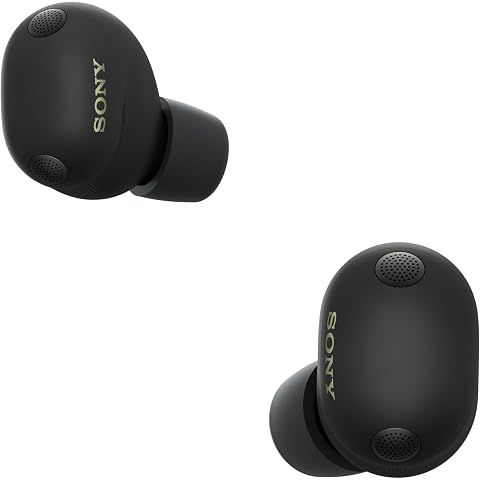
The touch controls on the Sony WF-1000XM6 are way more flexible than previous models. You can now customize pretty much everything.
Each earbud has four touch gestures: single tap, double tap, triple tap, and long press. You can assign different functions to each one, independently for left and right. So that's eight total customizable actions.
The functions you can assign include the usual stuff: play/pause, skip tracks, activate your voice assistant, toggle noise cancellation modes, and adjust volume. There's also Quick Attention, which temporarily pauses your audio and lets outside sound in while you hold your finger on the earbud โ handy for quick conversations.
Volume control works by long-pressing and sliding up or down. It takes a bit of practice to get the feel for it, but once you do, it's nice not having to grab your phone.
Setting all this up happens in the Sony Sound Connect app. You pick the earbud, then assign functions to each gesture. The interface is straightforward.
This is a big step up from the XM5, where you were stuck with preset control schemes. Now you can set things up exactly how you want.
One thing people have asked for that's missing: a quick way to disable touch controls entirely without opening the app. Like a home screen widget. That's not available yet, so if you need to disable touch to avoid accidental presses, you have to dig into the app settings.
Here's our "TLDR" Review
Download ShopSavvy AppCompare prices for anything in real-time, set price alerts, watch for deals by keyword, and much more
Install ShopSavvy Browser ExtensionCompare and track prices automatically while you shop online at thousands of websites.
If you're still curious about the , here are some other answers you might find interesting:
At $330, the WF-1000XM6 is definitely a premium purchase. Whether it's worth it really depends on what matters to you.
If you care deeply about audio quality and you're on Android, these are genuinely among the best-sounding wireless earbuds you can buy. Add in LDAC support for high-res streaming, excellent noise cancellation, and a companion app with more customization options than most people will ever use, and you're getting a lot of capability for your money.
The call quality improvements are also substantial. If you work from home or take a lot of calls, that alone might justify the upgrade.
But let's be realistic about alternatives. The AirPods Pro 3 cost $249 and offer very similar overall quality with better Apple integration. If you're an iPhone user who doesn't care about audiophile-level sound tuning, you might be just as happy with AirPods and $80 still in your pocket.
And if you already have the XM5, the upgrade is hard to justify. You're paying $30 more than the XM5's launch price for improvements that are real but incremental. Unless better call quality or marginally improved ANC are critical for you, the XM5 does most of what the XM6 does.
For someone buying into the Sony ecosystem fresh, or upgrading from older earbuds, the value proposition is much stronger. You're getting genuinely top-tier hardware that'll serve you well for years.
Bottom line: it's expensive, but you get what you pay for. The question is whether you need everything it offers.
The Sony Sound Connect app is essential for getting the most out of your WF-1000XM6. It's where all the customization happens.
The equalizer is probably what most people care about. You get a full 10-band EQ with plenty of adjustment range. There are presets if you don't want to mess with sliders, or you can use the "Find Your Equalizer" feature โ it plays different sound profiles and builds a custom EQ based on what sounds best to you. It's actually pretty clever and takes the guesswork out of tuning.
Noise control settings let you fine-tune both ANC and ambient sound across 20 levels each. You can also set up Adaptive Sound Control, which automatically changes your ANC settings based on what you're doing โ walking, running, sitting still, or on public transit.
Touch controls are fully customizable through the app. Single tap, double tap, triple tap, long press โ you can assign different functions to each gesture on each earbud. If accidental taps are bugging you, you can disable specific gestures entirely.
The app handles all your connection settings too: multipoint for connecting two devices, choosing between sound quality and connection stability, and managing which Bluetooth codec to prioritize.
Practical stuff like checking battery levels (for each earbud and the case separately), downloading firmware updates, and running a fit test are all in there. The fit test is worth doing โ it uses your phone's camera and audio measurements to make sure you're getting a proper seal.
The app's available on both iOS and Android. Some features ask you to create a Sony account, but most stuff works without it.
The Sony WF-1000XM6 earbuds are water-resistant, but definitely not waterproof. There's an important distinction there.
They have an IPX4 rating, which means they can handle splashes and sweat. Normal gym sessions? Fine. Getting caught in light rain? Also fine. But don't jump in a pool with them or take them into the shower โ that's going beyond what they're designed for.
The charging case has zero water protection, so keep that completely dry. Don't toss it in your gym bag next to a sweaty towel.
For everyday use, the IPX4 rating is practical. You can work out hard, deal with unexpected weather, and not worry about ruining your $330 earbuds. Just wipe them down after particularly sweaty sessions to keep moisture from building up around the ports and sensors.
If you need something for swimming, surfing, or really extreme conditions, the AirPods Pro 3 has better water resistance at IP57 โ they can actually handle brief submersion. But for most people in most situations, the XM6's IPX4 is plenty.
One thing to keep in mind: water damage from going beyond the IPX4 rating won't be covered by warranty. So when you're in doubt, err on the side of keeping them dry.
Loading trending deals...
Get the latest news, and updates on ShopSavvy. You'll be glad you did!