


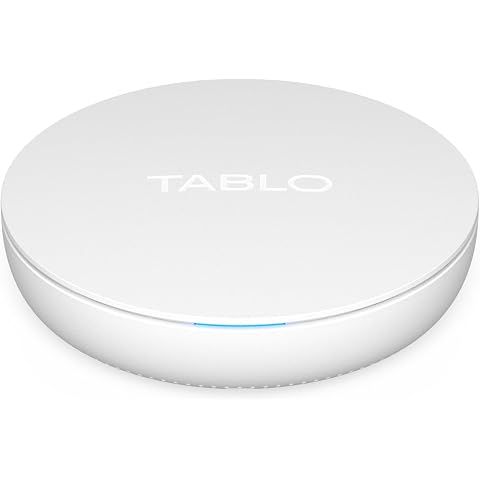
The Tablo 4th Gen 2-Tuner OTA DVR doesn't have built-in storage, so you'll need to connect a USB hard drive to it for storing your recordings.
According to our research, the manufacturer suggests using a USB drive with a capacity between 1 TB and 8 TB. It's a flexible approach, letting you adjust storage according to how much TV you plan to record.
To give you an idea, a 1 TB drive allows for about 250 hours of HD recordings, while an 8 TB drive can store roughly 2000 hours. Just make sure the drive you choose is compatible with the Tablo DVR for smooth recordings.
As for streaming, you can use the Tablo app on various platforms like Roku, Amazon Fire TV, and Android TV.
It's also available for iOS and Android for watching on phones and tablets. But keep in mind, there might be some app limitations with certain smart TVs and Apple TV.
Plus, there's no dedicated app for PC or Mac yet, which is worth considering if you often watch on those devices.
So, in short, the Tablo DVR is pretty versatile with streaming across different devices, and you can get a lot of storage with the right external hard drive.
Just make sure everything's compatible with your setup to keep things running smoothly.
How we researched this
Where this comes from: This answer is based on ShopSavvy's product database, real-time pricing from 2 retailers, and a look at hundreds of user reviews to give you a well-rounded picture.
Where to Buy


Considering the Tablo 4th Gen 2-Tuner OTA DVR?
Here's our "TLDR" Review
 Download ShopSavvy App
Compare prices across thousands of stores in real-time, set price alerts, watch for deals by keyword, and much more.
 Install ShopSavvy Browser Extension
Compare and track prices automatically while you shop online at thousands of websites.
More Answers
If you're still curious about the Tablo 4th Gen 2-Tuner OTA DVR, here are some other answers you might find interesting:
You can definitely watch your Tablo recordings when you're not at home, but it's good to be aware of a few things.
The Tablo 4th Gen 2-Tuner OTA DVR is a great pick for those looking to cut the cord, as it allows you to record and watch over-the-air broadcasts without dealing with monthly fees. It starts with 128GB of storage—around 50 hours of content—but you can add up to 8TB with an external hard drive if you need more space.
Our research indicates there might be occasional connectivity or performance hiccups, but generally, people seem happy with the high-definition video quality. Setting it up, though, can sometimes be a bit of a hassle. Some have run into error messages or needed a few tries to get it working right.
It can be frustrating, especially if you’re not too into tech stuff, and might require a few calls to support for help.
Putting those setup challenges aside, the Tablo DVR comes with some great features, especially for someone trying to move away from cable. It lets you stream free channels, giving you a lot of viewing choices. However, your experience might vary based on your network setup, as buffering and slow connections occasionally pop up.
If you're c
The Tablo 4th Gen 2-Tuner Over-The-Air (OTA) DVR hooks you up with a great way to record and watch TV without those annoying subscription fees. According to the manufacturer's product description, you can stash up to 50 hours of TV with its 128GB internal storage, but if that's not enough, just pop in some external USB storage.
Now, about what devices it works with—it’s pretty flexible. Our research shows you can use it with all the popular streaming devices like Roku, Amazon Fire TV, and Apple TV.
You can also watch on your iOS or Android tablets and phones, and even use your computer through a web browser. So basically, you can catch your shows on almost any screen at home.
Some folks who’ve tried it say the device switching is smooth, though a few have run into minor issues like buffering or software hiccups. It’s something to keep
The Tablo 4th Gen OTA DVR has two tuners, which means you can record shows from two different channels at the same time. This is great if you like watching one program while recording another, or if your household has different shows queued up at the same time.
It's good to know that this DVR operates using the ATSC 1.0 broadcast standard. While it doesn't support the newer ATSC 3.0 standard, which has features like better video and audio quality, our research suggests that many broadcasts will continue to support ATSC 1.0 until at least 2027. So, you're still covered for current TV shows.
For most people, sticking with ATSC 1.0 won't be a big deal, and the Tablo 4th Gen is a solid choice for recording OTA television. If you're aiming to experience ATSC 3.0's enhanced features like immersive audio, you might want to look at other options.
Also, it's worth mentioning that the Tablo 4th Gen comes with 128GB of built-in memory, giving you about 50 hours of recording time. You can also expand the storage with an external hard drive for more space.
In summary, although this device doesn't support ATSC 3.0, it does the job well with ATSC 1.0 and is a handy, subscription-free way to e
Hey! If you're thinking about using the Tablo 4th Gen 2-Tuner OTA DVR, you don't need to worry about a subscription for its basic functions. You can record live TV without any extra fees, which is nice if you're trying to save on costs.
That said, if you want to get a bit fancier with features like longer guide data (14 days) and skipping commercials automatically, they do have an optional subscription. Totally up to you though—your DVR will still work just fine using the standard 24-hour guide you get for free.
The DVR is built with ATSC 1.0 tuners, which is what TV networks are currently using. So, while everyone’s talking about the new ATSC 3.0 with better picture quality and interactive features, you’re still good with the current version for a while—at least until 2027, according to the manufacturer.
Our research shows folks are generally pleased with how affordable and effective this DVR is, especially if you're okay with sticking with ATSC 1.0 for the time being. Plus, it holds up to 50 hours of HD recordings, and you can add more space with a USB drive.
Wh
🔥 Trending Deals




Footer 1
Get ShopSavvy
ShopSavvy
- Price Comparison
- Compare Prices
- App
- Browser Extension
- Desktop App
- Browser
- QR Code Reader
- ShopSavvy for Business
- AI Agents
- Data API
- Integrations
- Data API Dashboard
- Universal Product Search API
- Bulk Data Licensing
- For Retailers
- Share Your Product Feed
- Data Partners
- Help
- Advertise with Us
- About
- Compare
- Blog
- Press Kit
- Press Inquiries
- Business Inquiries
Subscribe for Updates
Get the latest news, and updates on ShopSavvy. You'll be glad you did!