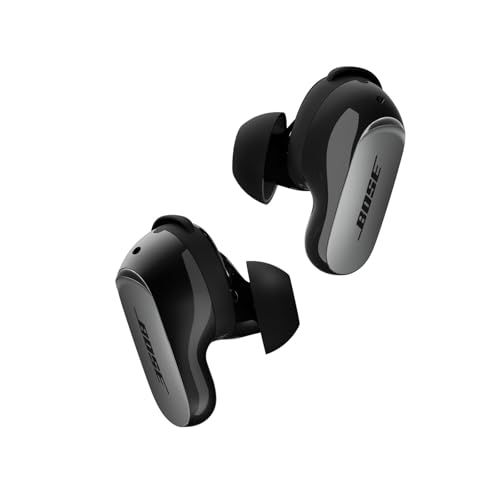
Ever put in earbuds and felt like the music was trapped inside your head? That's not how sound is supposed to work—and Bose agrees. Their Immersive Audio technology solves exactly that problem on the QuietComfort Ultra Earbuds 2nd Gen.
What Makes It Different
Think about how you experience music from actual speakers. The sound comes from somewhere out there, not from inside your skull. Bose Immersive Audio recreates that sensation by virtually projecting sound in front of you rather than directly into your ears.
The magic happens through a clever combination of head-tracking sensors and sophisticated audio processing. When you turn your head while listening, the sound stays anchored in place—exactly like it would with real speakers in a room. It's a subtle effect that makes a surprisingly big difference in how natural everything sounds.
Two Ways to Experience It
Still Mode is your go-to when you're stationary—at your desk, on the couch, wherever you're not moving around. The audio locks into position and stays there, perfect for focused listening.
Motion Mode keeps the sound in front of you even when you're on the move. Walking to work? Running errands? The audio follows your movement so it always feels like it's coming from ahead.
Why People Love It
Here's what surprised me most: you don't need special audio files or Dolby Atmos tracks for this to work. It processes any audio you throw at it—Spotify, YouTube, podcasts, whatever. The result is a wider, more open soundstage that makes your favorite music feel fresh again.
Many users also report less listening fatigue. That "earbuds-in-your-head" feeling can get tiresome after extended sessions. Immersive Audio gives your brain a break by presenting sound more naturally.
The Trade-Off
Nothing's free, right? Immersive Audio cuts your battery life from about 6 hours down to 4. The processing requires extra power. Whether that trade-off works for you depends on how long your listening sessions typically run—and how much you value the spatial effect.
Getting Started
Open the Bose Music app, find your earbuds, and look for the Immersive Audio toggle. There's even a built-in demo so you can hear exactly what changes when you switch modes. Try it with a song you know well—the difference is easier to spot that way.
Pro tip: Start with Still Mode while sitting at your desk, then switch to Motion Mode when you head out. You'll quickly develop a feel for which mode suits different situations.
We may earn a commission when you buy through these links, at no extra cost to you. How ShopSavvy makes money
How we researched this
Where this comes from: this answer draws on the product's published specifications and the reviews ShopSavvy collected for it, alongside prices from ShopSavvy's price data.
 Download ShopSavvy App
Compare prices across tens of thousands of stores, set price alerts, watch for deals by keyword, and much more.
 Install ShopSavvy Browser Extension
Compare and track prices automatically while you shop online at thousands of websites.
More Answers
If you're still curious about the , here are some other answers you might find interesting:
- How do the Bose QuietComfort Ultra Earbuds 2nd Gen compare to the Samsung Galaxy Buds3 Pro?
The Bose QuietComfort Ultra Earbuds 2nd Gen and Samsung Galaxy Buds3 Pro are both premium earbuds, but they're built for different priorities. Here's how they...
- What is Cinema Mode on the Bose QuietComfort Ultra Earbuds 2nd Gen?
Cinema Mode is Bose's attempt to make movies and TV shows sound like you're in an actual theater—even though you're wearing QuietComfort Ultra Earbuds 2nd Gen....
- How do the touch controls work on the Bose QuietComfort Ultra Earbuds 2nd Gen?
The QuietComfort Ultra Earbuds 2nd Gen have touch controls on both sides. Here's what you can actually do with them. Tap once — Play/pause. Also answers or...
- Are the Bose QuietComfort Ultra Earbuds 2nd Gen waterproof?
Short answer: No. But the QuietComfort Ultra Earbuds 2nd Gen handle sweat and rain just fine. These earbuds have an IPX4 rating. In plain English: they can...
- What problems and issues do users commonly report with the Bose QuietComfort Ultra Earbuds 2nd Gen?
No product is perfect. Here are the issues people actually run into with the QuietComfort Ultra Earbuds 2nd Gen—and what you can do about them. Some people...
- What's included in the box with the Bose QuietComfort Ultra Earbuds 2nd Gen?
Opening the box for the first time? Here's everything you'll find inside your QuietComfort Ultra Earbuds 2nd Gen. The earbuds — Left and right, already set up...
- How long does it take to charge the Bose QuietComfort Ultra Earbuds 2nd Gen?
Planning your listening time with the QuietComfort Ultra Earbuds 2nd Gen? Here's the full picture on charging and battery life. Your earbuds get about 6 hours...
- What is ActiveSense on the Bose QuietComfort Ultra Earbuds 2nd Gen?
Most earbuds give you a simple choice: noise cancellation on, or off (transparency mode). ActiveSense on the QuietComfort Ultra Earbuds 2nd Gen makes that...
- What is SpeechClarity technology on the Bose QuietComfort Ultra Earbuds 2nd Gen?
The biggest complaint about the original QuietComfort Ultra Earbuds? Call quality. People on the other end couldn't always hear you clearly, especially in...
- Are the Bose QuietComfort Ultra Earbuds 2nd Gen compatible with Android phones?
Good news for Android users—the QuietComfort Ultra Earbuds 2nd Gen work great with your phone. And honestly, they might work better for you than AirPods would....




